Introduction
Azure powers everything from early-stage SaaS startups to Fortune 500 enterprises — and that scale creates a sprawling, hard-to-monitor attack surface. Cloud infrastructure introduces configuration drift and identity sprawl that are easy to miss until something breaks.
The numbers back this up. According to the IBM Cost of a Data Breach Report 2023, 82% of data breaches involved data stored in cloud environments — public, private, or hybrid. By 2024, the average breach cost hit a record $4.88 million.
The root causes are consistent: misconfigurations, over-privileged identities, and weak network controls. Most organizations only find these gaps when an incident forces the audit.
This guide covers what an Azure Security Assessment is, which domains it examines, how to run one systematically, and why automated tools alone aren't enough.
TLDR
- 82% of breaches involve cloud data — Azure environments are a primary target
- Misconfigurations and weak IAM are the most exploited customer-side risks
- A thorough assessment covers five domains: IAM, network, data, configuration, and application security
- Automated tools miss business logic flaws and chained attack paths — manual testing fills that gap
- Assessments should run annually at minimum, with targeted reviews after major changes
What Is an Azure Security Assessment?
An Azure Security Assessment is a structured review of your entire Azure environment — IAM configurations, network controls, data encryption, application security, and compliance posture — designed to identify vulnerabilities and control gaps before attackers find them.
To assess your environment accurately, you first need to know what you're responsible for — and that starts with the Shared Responsibility Model.
The Shared Responsibility Model
Every assessment starts with the Azure Shared Responsibility Model. Microsoft secures the physical infrastructure, hypervisor, and networking fabric. Everything else — your identity configurations, data, access controls, and application settings — is on you.
| Responsibility Area | IaaS | PaaS | SaaS |
|---|---|---|---|
| Physical infrastructure | Microsoft | Microsoft | Microsoft |
| Operating system | Customer | Microsoft | Microsoft |
| Network controls | Customer | Shared | Microsoft |
| Applications | Customer | Customer | Microsoft |
| Identity and accounts | Customer | Customer | Customer |
| Data and information | Customer | Customer | Customer |
The pattern is clear: identity and data remain the customer's responsibility across every deployment model. That's also where the vast majority of real-world breaches originate.
Three Core Objectives
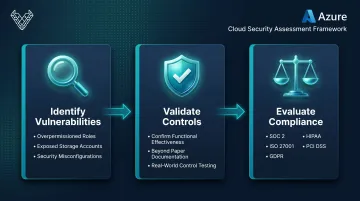
A well-run Azure Security Assessment covers three distinct outcomes:
- Identify vulnerabilities and misconfigurations — find what's broken before attackers exploit it, including overpermissioned roles and exposed storage accounts
- Validate existing controls — confirm that your security measures actually work, not just that they exist on paper
- Evaluate compliance posture — measure your alignment with SOC 2, ISO 27001, GDPR, HIPAA, or PCI DSS, depending on your regulatory context
Point-in-Time vs. Continuous Monitoring
A periodic, in-depth assessment is not the same as day-to-day monitoring via Microsoft Defender for Cloud. Continuous monitoring catches known misconfigurations as they emerge. A structured assessment goes deeper — it examines how your controls interact, where privilege escalation paths exist, and whether your architecture holds up against realistic attack scenarios.
Think of continuous monitoring as your early-warning system and the structured assessment as your full diagnostic — each does something the other can't.
Who Should Conduct the Assessment?
- Internal cloud security engineers for routine configuration reviews and Secure Score monitoring
- Qualified third-party firms for assessments that bring adversarial perspective and regulatory rigor — especially before major launches, compliance audits, or after significant infrastructure changes
External assessors surface privilege escalation paths and control gaps that internal teams, familiar with their own architecture, tend to overlook.
Key Areas Covered in an Azure Security Assessment
A thorough assessment isn't a single scan. It evaluates five distinct security domains, each with its own risk profile and testing approach.
Identity and Access Management (IAM)
IAM is consistently the most exploited attack surface in Azure. According to the Microsoft Digital Defense Report 2024, Microsoft blocks more than 600 million identity attacks per day, with over 99% being password-based.
An IAM assessment examines:
- MFA enforcement across admin and privileged accounts
- RBAC role assignments and hygiene (unused roles, over-broad permissions)
- Conditional Access policy coverage and gaps
- Dormant or orphaned accounts and service principals
- Privilege escalation paths through custom role definitions
- Over-permissioned managed identities
Research shows 99% of cloud identities are over-privileged — meaning lateral movement is a near-universal risk in unreviewed Azure environments.
Network Security
Network security reviews focus on how traffic flows through your Azure environment and where it shouldn't be able to enter.
Key areas include:
- Network Security Group (NSG) rule configurations, particularly inbound rules that expose unnecessary ports
- Azure Firewall settings and policy consistency
- VNet segmentation and peering configurations
- Exposed public endpoints that should be private
- Private Link usage and DDoS protection status
Misconfigured NSGs are one of the most common findings in Azure assessments. An overly permissive inbound rule may seem minor in isolation. Once an attacker gains initial access, it becomes the pathway for lateral movement across the environment.
Data Security
Data security assessments focus on three pillars:
- Encryption at rest: Storage Service Encryption, disk encryption, and database TDE
- Encryption in transit: TLS enforcement across services and APIs
- Data access controls: who and what can access storage accounts, databases, and Key Vault secrets
These three pillars only work when you know what you're protecting. Data classification — mapping what's sensitive and where it lives — is the prerequisite. Without it, encryption and access controls get applied inconsistently, leaving regulated data exposed while over-securing low-value assets.
Configuration and Compliance
This domain checks whether Azure resources are configured against established security baselines. The two primary references are the CIS Microsoft Azure Foundations Benchmark (v3.0.0, with approximately 91 Level 1 controls) and the Microsoft Cloud Security Benchmark (MCSB), which activates by default when Defender for Cloud is enabled.
Common configuration failures include:
- Diagnostic logging disabled on critical resources
- Publicly accessible Blob Storage containers
- Missing resource locks on production infrastructure
- Absent activity log alerts for privileged operations
SentinelOne data shows an average of 43 misconfigurations per cloud account — which means configuration drift alone can generate more findings than every other domain combined.
Application Security
Applications running in Azure — web apps, APIs, containerized workloads — are tested for both known vulnerability classes and logic-level flaws.
Testing typically combines:
- Static analysis: code review for hardcoded secrets, insecure dependencies, and configuration issues
- Dynamic testing: live application testing for injection attacks, broken access controls, XSS, and insecure direct object references (IDOR)
Application-layer testing is where automated tools show their limits most clearly. Business logic flaws such as IDOR, privilege escalation, and workflow bypass use valid requests with no malicious payload, making them invisible to scanners.
How to Conduct an Azure Security Assessment: Step-by-Step
An Azure Security Assessment is a multi-phase process. Running tools without a plan produces noise, not findings. Here's the structure that works.
Phase 1 — Define Scope and Objectives
Before any tool runs, establish clear goals:
- What's driving the assessment — compliance audit, pre-launch review, post-incident investigation?
- Which subscriptions, resource groups, regions, and service types are in scope?
- What is explicitly out of scope?
Involve stakeholders from IT, security, compliance, and business leadership at this stage. Scope gaps discovered mid-assessment waste time and may leave critical assets unreviewed.
Phase 2 — Inventory and Documentation
Pull a complete inventory of Azure resources: VMs, storage accounts, databases, managed identities, service principals, and network configurations. Document existing security controls, gather network topology diagrams, and collect any previous audit reports.
Without this baseline, you can't measure drift from expected configuration — and drift is exactly what assessments are designed to catch.
Phase 3 — Technical Assessment Execution
Assessors use a combination of native Azure tools and manual testing techniques:
- Microsoft Defender for Cloud — CSPM findings and Secure Score
- Azure Advisor — configuration and optimization recommendations
- Microsoft Entra ID — identity review, conditional access, privileged role assignments
- Third-party scanners — for additional coverage and cross-validation
Assessors test each of the five security domains in sequence. The depth of findings depends heavily on whether automated tools are supplemented with manual, threat-led testing — automated scans catch known misconfigurations; manual testing surfaces the attack chains they miss.
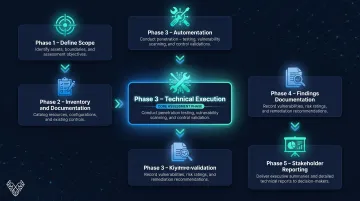
Phase 4 — Findings Documentation
Scanner output needs to be translated into structured findings before it's useful. Every finding should be documented with:
- Clear description of the issue
- Affected resource (specific, not generic)
- Risk severity using CVSS or equivalent scoring
- Evidence (screenshot, API response, configuration export)
- Recommended remediation step
Findings must be framed in the context of the specific environment. A medium-severity misconfiguration on a storage account holding regulated data may warrant the same urgency as a critical finding on a low-risk dev resource.
Phase 5 — Stakeholder Reporting and Handoff
Findings need to reach the right audiences, not just the technical team. A well-structured report includes:
- An executive summary that translates technical risk into business impact
- A technical findings section with full remediation guidance
- A prioritized remediation roadmap that tells teams what to fix first and why
CVSS scores mean little to a CFO deciding where to allocate budget. Business impact framing is what turns an assessment report into a tool that drives real decisions.
How to Analyze Results and Prioritize Remediation
Risk-Based Triage
Not every finding demands the same response speed. Use this model:
- Critical/High — address immediately: exposed credentials, publicly accessible sensitive data, unencrypted regulated data, or direct privilege escalation paths
- Medium — schedule within 30-60 days: context matters here; a medium finding on a resource holding PII may need to move up
- Low — remediation backlog: track, schedule, and close systematically
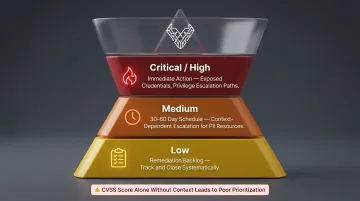
CVSS provides a consistent baseline, but severity ratings without context lead to poor prioritization decisions. That context shapes not just how fast you act, but how you structure the remediation plan itself.
Building a Remediation Plan
A finding is not remediated until it's verified. Each item in the remediation plan needs:
- A named owner — one specific team or individual, not a shared inbox
- A real deadline — not "ASAP," but a calendar date with accountability
- Documented proof of fix — screenshot, configuration export, or re-test output
Track remediation progress over time. Unresolved findings from past assessments are a reliable indicator of accumulated security debt — and a liability when regulators or auditors come looking.
Schedule a follow-up assessment or targeted re-test after remediation is complete. Fixes don't always hold — re-testing confirms the vulnerability is actually gone, not just patched on the surface.
Limitations of Automated Tools: Why Manual Testing Matters
Microsoft Defender for Cloud and Azure Advisor are excellent for continuous posture monitoring. They catch known misconfigurations quickly and consistently. But they have a hard boundary: they detect what they're programmed to look for.
They cannot reason about your business logic, chain multiple low-severity findings into a critical attack path, or model how a real attacker would move through your specific environment.
What Automated Scanners Routinely Miss
As NIST SP 800-115 confirms, automated tools cannot identify vulnerabilities requiring multi-step exploitation or design-level flaws. In Azure environments specifically, scanners routinely miss:
- Misconfigured trust relationships between managed identities
- Privilege escalation paths through custom RBAC role combinations
- Insecure cross-tenant access configurations
- Application-layer logic flaws (IDOR, workflow bypass, payment manipulation)
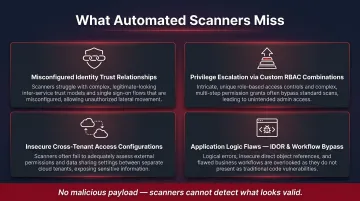
These vulnerabilities use syntactically valid requests — there's no malicious payload for a scanner to detect. Only a human tester who understands what the application is supposed to do can identify when that intended behavior is being abused.
Where Manual Testing Fills the Gap
For organizations handling sensitive data or operating under compliance requirements — SOC 2, ISO 27001, GDPR — automated scanning alone doesn't deliver the coverage needed.
This is the gap that manual, threat-led testing is designed to close. At Vynox Security, assessors repeatedly find that organizations relying on automated scans carry exploitable risk they aren't aware of — attack chains and logic flaws that no scanner flagged. A manual-first approach surfaces these issues by combining attacker thinking with deep knowledge of how your specific Azure environment is configured.
Azure Security Assessment Best Practices
Treat It as a Program, Not a Project
Security assessments lose value the moment they become one-time events. Recommended cadence:
- Comprehensive assessment at least annually (aligned with NIST SP 800-115 and ISO 27001 guidance)
- Targeted re-assessments after major infrastructure changes, new application deployments, or significant regulatory updates
- Continuous monitoring via Defender for Cloud running in between
For regulated industries, annual is the floor — not the target.
Embed Security at the Design Phase
Retrofitting security controls after deployment is far more expensive than building them in from the start. Use the CIS Microsoft Azure Foundations Benchmark and Microsoft Cloud Security Benchmark as architecture baselines — not just audit checklists.
Getting these decisions right at design time costs a fraction of fixing them in production:
- Access policies — define least-privilege roles before workloads go live
- Encryption requirements — specify data-at-rest and in-transit standards upfront
- Network segmentation — design zone boundaries before resources are deployed
Three Operational Practices Worth Enforcing
- Least-privilege access — review permissions quarterly; over-privileged identities accumulate fast in active Azure environments
- Diagnostic logging and monitoring — every critical resource needs logging enabled so incidents can be detected and investigated, not discovered after the fact
- Team training — cloud and development engineers who understand Azure-specific security risks catch misconfigurations before they reach production
Frequently Asked Questions
Which Microsoft service provides continuous security posture assessment and threat protection for Azure resources?
Microsoft Defender for Cloud is the primary native service — it combines CSPM (to surface misconfigurations and calculate Secure Score) with a Cloud Workload Protection Platform for real-time threat detection across VMs, containers, and databases. The paid Defender CSPM tier adds attack path analysis and cloud security graph capabilities.
How secure is the Microsoft Azure cloud?
Azure's underlying infrastructure is secured by Microsoft, but security is a shared responsibility. Most real-world breaches stem from customer-side misconfigurations, weak IAM controls, and insufficient monitoring — not from failures in Microsoft's physical or network infrastructure.
How long does an Azure Security Assessment take?
Duration depends on scope and complexity. A basic assessment of a small Azure environment typically takes 3-5 days. A comprehensive assessment covering a large, multi-subscription enterprise environment with application testing can take 2-4 weeks.
How often should you perform an Azure Security Assessment?
At minimum, once per year — aligned with NIST and ISO 27001 guidance. Trigger additional assessments after major infrastructure changes, new application launches, or upcoming compliance audits. Continuous automated monitoring should run in between.
What is the difference between an Azure Security Assessment and penetration testing?
An Azure Security Assessment is a broad review of configurations, controls, and compliance posture — it identifies what's misconfigured or missing. Penetration testing goes further by actively simulating attacker techniques to validate whether those gaps can be exploited and what damage could result.
Does the US government use Azure?
Yes. The US government uses Microsoft Azure through Azure Government, a dedicated cloud environment that holds FedRAMP High authorization and supports DoD Impact Levels 2, 4, and 5 — making it one of the most widely adopted cloud platforms across US federal agencies.