Introduction
Cloud infrastructure misconfigurations are now the leading cause of cloud security breaches — and most organizations don't find out until the damage is done. Gartner estimates that 99% of cloud security failures through 2025 are the customer's fault, with misconfigured services and overly permissive access controls as the primary culprits — not failures on the provider's side.
Deploying workloads in the cloud is only part of the equation. The security controls, IAM policies, network configurations, and compliance posture surrounding those workloads all require systematic, ongoing evaluation. Most teams lack that visibility until an incident makes the gap impossible to ignore.
A cloud security posture assessment gives you that visibility before attackers find it first. This guide covers what the assessment involves, why it matters, how to run one step by step, and what experienced assessors consistently find inside real cloud environments.
TL;DR
- A cloud security posture assessment systematically evaluates your cloud configurations, access controls, and compliance status to surface exploitable risks.
- Misconfiguration, over-privileged identities, and logging gaps are the most common findings — and most automated tools miss them.
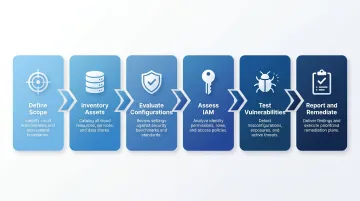
- The process follows six phases — from scope definition and asset inventory through IAM review, vulnerability testing, and remediation planning.
- Cloud environments change constantly — one-time assessments aren't enough; posture drift is ongoing.
- Manual-led assessments catch attack chains and business logic flaws that CSPM tools cannot detect.
What Is a Cloud Security Posture Assessment?
A cloud security posture assessment is a structured review of how well your cloud environment is secured. It covers infrastructure configurations, identity and access management, network controls, data protection practices, and compliance alignment — across all in-scope cloud accounts and services.
Assessment vs. CSPM Tools
Many organizations already use Cloud Security Posture Management (CSPM) tools — like Microsoft Defender for Cloud or AWS Security Hub — and assume that covers the assessment requirement. It doesn't. CSPM tools continuously monitor cloud environments for misconfigurations and benchmark deviations, but they're built for ongoing visibility, not deep manual validation:
| Capability | CSPM Tools | Manual Assessment |
|---|---|---|
| Configuration auditing | ✅ Yes | ✅ Yes |
| Continuous monitoring | ✅ Yes | ❌ Point-in-time |
| Exploitability validation | ❌ No | ✅ Yes |
| Attack chain identification | ❌ Limited | ✅ Yes |
| Logic flaw detection | ❌ No | ✅ Yes |
| Detective control testing | ❌ No | ✅ Yes |
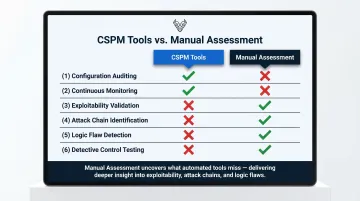
A manual assessment goes deeper. Experienced testers determine whether findings are actually exploitable, how they chain together, and what the real-world business impact would be — which is what drives meaningful prioritization.
Three Core Outputs Every Assessment Should Produce
- A current-state baseline — documented security posture across all in-scope accounts and services
- A prioritized vulnerability list — misconfigurations and control gaps ranked by exploitability and business impact
- Actionable remediation guidance — specific fixes mapped to risk severity and relevant frameworks (SOC 2, ISO 27001, GDPR, NIST CSF)
Why Your Cloud Environment Needs a Security Posture Assessment
The Shared Responsibility Gap
Cloud providers secure the infrastructure. Everything above that — how you configure services, manage access, and govern your data — is your responsibility. That line is exactly where most breaches occur.
The numbers back this up: Gartner's prediction of 99% customer-fault cloud failures isn't an outlier. Unit 42 found that 99% of cloud users, roles, services, and resources were granted excessive permissions that went unused — across 680,000+ identities in 18,000 cloud accounts. The gap between what organizations think they've secured and what's actually exposed is consistently wider than expected.
Key Risks That Make Assessment Critical
- Configuration drift — cloud resources are provisioned and modified constantly; security settings drift out of compliance between reviews
- Shadow IT and unmanaged assets — workloads spun up outside central IT oversight create blind spots that neither teams nor tools are watching
- Over-permissioned identities — excessive IAM roles and static credentials lower the barrier for lateral movement after an initial compromise
- Compliance exposure — unreviewed environments frequently violate GDPR, SOC 2, or HIPAA controls without the organization realizing it until an audit or breach forces it into the open
Each of these risks carries a real price tag — and the numbers make the case for assessment faster than any policy document.
The Cost Argument
The IBM Cost of a Data Breach Report 2025 puts the global average breach cost at $4.44 million. Breaches spanning multiple environments, including public cloud, exceeded $5 million on average. Remediation timelines stretched to 283 days.
A proactive cloud security posture assessment costs a fraction of that — and gives you evidence of what's actually exposed before an attacker finds it first.
How to Conduct a Cloud Security Posture Assessment: Step-by-Step
The most common failure mode isn't skipping steps — it's rushing through scoping, or treating the assessment as a one-time compliance checkbox rather than a risk-driven exercise. Here's how to do it properly.
Step 1 – Define Scope and Objectives
Start by identifying what's in scope:
- Which cloud platforms (AWS, Azure, GCP, or multi-cloud)
- Which accounts, regions, and workloads
- Which data classifications apply
Prioritize scope around the highest-risk areas first — customer-facing systems, production environments, and externally exposed services. Then clarify the assessment objective. SOC 2 readiness, post-incident review, pre-migration baseline, and routine hygiene check each require different emphasis. The objective determines which controls get the deepest scrutiny.
Step 2 – Inventory and Classify Cloud Assets
Enumerate every cloud resource: compute instances, containers, serverless functions, storage buckets, databases, managed services, and IAM entities. Most organizations discover assets they didn't know existed at this stage — untagged resources, forgotten development environments, and orphaned accounts.
Once inventoried, classify assets by criticality and data sensitivity. A publicly accessible S3 bucket storing customer PII is a fundamentally different risk than an internal logging bucket. Classification drives where assessment effort goes.
Step 3 – Evaluate Configurations and Security Controls
Review how controls are implemented across the environment:
- Network segmentation and firewall rule permissiveness
- Encryption at rest and in transit
- MFA enforcement across accounts
- Logging and monitoring configurations
- Key management practices
Benchmark findings against CIS Benchmarks (the AWS Foundations Benchmark is at v3.0.0), NIST CSF 2.0, and cloud provider security best practices. Document every deviation.
Misconfigurations that create direct external exposure get flagged separately from internal hygiene issues — the remediation urgency and business impact are fundamentally different.
Step 4 – Assess Identity and Access Management
Review user roles, service accounts, and cross-account permissions against the principle of least privilege. Any permission not actively required is unnecessary risk surface.
Common IAM findings to examine:
- Static credentials still in active use
- Privileged accounts without MFA
- Absence of IP or geographic restrictions on sensitive roles
- Excessive trust relationships between cloud accounts or third-party services
IAM issues rank among the highest-severity discoveries in cloud assessments because they directly enable lateral movement after compromise.
Step 5 – Test for Vulnerabilities and Exploitable Attack Paths
Run both automated scans and manual penetration testing. Automated tools identify known CVEs and configuration flags, but manual testing is what maps realistic, multi-step attack paths through your actual environment.
A concrete example from Vynox Security's assessments: a fintech client had a Lambda function triggered by a public S3 bucket upload. The function lacked input validation and used an overly permissive IAM role with database access. An attacker could manipulate the S3 upload trigger to execute unauthorized database queries — a critical attack chain that no configuration scanner flagged because each individual component appeared functional in isolation.
Scanners generate findings lists. Experienced testers determine which findings chain together into actual exploitation paths — and what the real-world blast radius looks like.
Step 6 – Report, Prioritize, and Plan Remediation
Compile findings into a prioritized report organized by severity — critical, high, medium, and low. Each finding should include:
- What was found
- Why it matters (business impact)
- How it can be exploited
- A specific remediation recommendation
Build a remediation roadmap with assigned ownership and clear timelines. Critical findings — publicly exposed data, privilege escalation paths — need immediate action. Medium and low findings feed into the ongoing security backlog.
Set a reassessment cadence. Posture improvement should be measurable quarter over quarter, not assumed.
What Cloud Security Assessments Commonly Uncover
Misconfigured Storage and Network Resources
Publicly accessible cloud storage remains one of the most consistent findings across environments. Datadog's State of Cloud Security research found that 36% of organizations using S3 have at least one publicly exposed bucket — despite significant industry attention to the problem over the past several years.
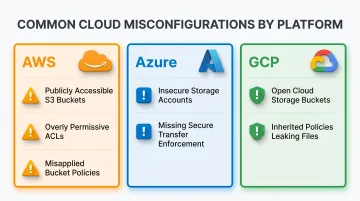
Vynox's assessors regularly find this pattern across all three major cloud platforms:
- AWS: Publicly accessible S3 buckets with overly permissive ACLs or misapplied bucket policies
- Azure: Insecure storage accounts with missing secure transfer enforcement
- GCP: Open Cloud Storage buckets with default or inherited policies leaking sensitive files
Open security group rules exposing SSH or RDP to 0.0.0.0/0 are similarly common — straightforward to fix but frequently overlooked in fast-moving environments.
IAM and Identity Issues
Over-privileged IAM roles appear in virtually every assessment. Common findings include:
- IAM roles and users granted Administrator Access in violation of least privilege
- Service accounts with human-level access that should be scoped to specific functions
- Azure AD administrators without MFA enabled
- GCP service accounts assigned broad Editor or Owner roles unnecessarily
- Unused accounts retaining standing privileges from previous projects
These findings are especially dangerous post-compromise. An attacker with valid credentials for an over-privileged identity can move laterally, exfiltrate data, or escalate access without triggering a single exploit.
Logging, Monitoring, and Incident Response Gaps
Many organizations have cloud-native monitoring enabled in name only. Assessors routinely find:
- Services running without Cloud Audit Logs, leaving no visibility during incidents
- Logs collected but not alerted on — monitoring that exists only for compliance paperwork
- Retention periods too short to support incident investigation
- Incident response playbooks that don't account for cloud-specific attack scenarios
Compliance and Governance Deficiencies
Assessment findings frequently map directly to SOC 2, ISO 27001, or GDPR control failures — particularly around data residency, access control documentation, and encryption requirements.
ISO 27001:2022 introduced Annex A Control 5.23 specifically for cloud services governance. Organizations that haven't reviewed their cloud posture against the 2022 revision are often carrying compliance gaps they don't yet know about.
How Vynox Security Can Help
Vynox Security conducts cloud security posture assessments across AWS, Azure, and GCP with a manual-first, threat-led approach. With 10+ years of experience and 200+ security assessments completed, their methodology is built around one question: if this environment were attacked in the real world, what would actually break?
In practice, automated CSPM tools produce findings lists against configuration benchmarks — but they stop there. Vynox's testers go further, tracing which findings chain into exploitable attack paths. A misconfigured Lambda function, a permissive IAM role, and a public S3 trigger can combine into unauthorized database access. That kind of multi-step scenario only surfaces through manual analysis.
That same rigor carries through to the deliverables. Assessment outputs map directly to SOC 2, ISO 27001, GDPR, and NIST CSF — providing audit-ready evidence, not just technical findings. Vynox structures reports for both engineering teams and compliance audiences, with remediation support that includes retesting to confirm fixes are properly implemented.

Vynox works with:
- Startups preparing for their first security review
- Mature organizations validating existing cloud controls
- Cloud-native SaaS providers building audit-ready evidence ahead of customer or investor due diligence
To scope a cloud security posture assessment, reach out to the Vynox team directly.
Frequently Asked Questions
What is a cloud security posture assessment?
A cloud security posture assessment is a structured evaluation of a cloud environment's configurations, access controls, and compliance posture — covering storage permissions, IAM roles, logging, and encryption. The output is a prioritized remediation plan that surfaces exploitable risks, not just configuration flags.
What is cloud security posture management (CSPM)?
CSPM refers to automated software that continuously monitors cloud environments for misconfigurations and compliance drift against known benchmarks. Unlike a manual assessment, CSPM tools cannot validate whether findings are exploitable or form real attack paths — they identify configuration issues, not risk.
What is the difference between CSPM and SIEM?
CSPM focuses on cloud configuration and posture — it's preventive and compliance-oriented, flagging misconfigurations before they're exploited. SIEM collects and correlates security event logs for real-time threat detection and incident response after events occur. They serve complementary but distinct functions in a cloud security stack.
How do you measure security posture?
Common indicators include open vulnerability counts and severity, CIS/NIST compliance scores, MFA enforcement coverage, patch rates, and mean time to remediate critical findings. Tracking these over time reveals whether your posture is improving or slipping.
What are the 4 C's of cloud security?
The 4 C's — Cloud, Cluster, Container, and Code — describe the layered security model for cloud-native environments. Each layer must be independently secured; weaknesses in an outer layer (Cloud or Cluster) undermine the security of inner layers regardless of how well the inner layers are hardened.
How much does cloud security posture management cost?
Automated CSPM tooling varies widely — Microsoft Defender for Cloud offers a free foundational tier, with its paid Defender CSPM plan priced at approximately $5.11 per billable resource per month. Manual assessment engagements are scoped by environment size and complexity. Most organizations benefit from pairing automated monitoring with periodic manual assessments to catch what tools miss.