Introduction
Cloud environments are under sustained, accelerating attack. According to CrowdStrike's 2024 Global Threat Report, cloud intrusions rose 75% year-over-year from 2022 to 2023 — and that momentum hasn't slowed.
Cloud platforms aren't the weak link — the pace of adoption is. Organizations migrate workloads faster than they secure them, and the gaps compound fast. Misconfigured storage buckets, over-permissioned IAM roles, exposed APIs, and forgotten legacy integrations pile up with every deployment, expanding the attack surface before anyone's mapped it.
Security assessments are supposed to close that gap. Too often, they don't. Teams run automated scans, check a compliance box, and move on — while chained attack paths and identity misconfigurations stay buried until a breach surfaces them.
This guide covers what a cloud infrastructure security assessment actually involves, how to run one that finds real risks, and what distinguishes a thorough evaluation from a scan report with a passing grade.
TL;DR
- A cloud infrastructure security assessment evaluates your environment's controls, configurations, and risks across IAM, network security, data protection, and workloads
- Misconfiguration is the #1 cloud threat — Gartner predicted 99% of cloud security failures through 2025 would be the customer's fault, not the provider's
- Assessments follow six stages: scoping, asset inventory, control evaluation, vulnerability scanning, penetration testing, and findings documentation
- Automated scanning alone misses business logic flaws, chained attack paths, and cloud-native misconfigurations — manual testing closes those gaps
- Regular assessments support SOC 2, ISO 27001, GDPR, and HIPAA compliance by confirming controls actually work
What Is a Cloud Infrastructure Security Assessment?
A cloud infrastructure security assessment is a structured evaluation of a cloud environment's security controls, configurations, and vulnerabilities. The goal is to identify exploitable risks, validate compliance posture, and produce a remediation roadmap that teams can act on immediately.
Cloud environments span multiple layers — each with its own attack surface. Assessments cover IaaS, PaaS, and SaaS environments, with scope that typically includes:
- Identity and access management (IAM) roles and permissions
- Virtual machines, containers, and serverless workloads
- Network architecture, security groups, and VPC configurations
- Storage, databases, and API endpoints
- Single-cloud and multi-cloud setups (AWS, Azure, GCP)
Three Assessment Approaches
| Approach | Speed | Depth | Best For |
|---|---|---|---|
| Automated scanning | Fast | Surface-level | Known CVEs, basic misconfigurations |
| Manual/threat-led testing | Slower | Deep | Attack chains, business logic, IAM abuse |
| Hybrid (recommended) | Balanced | Comprehensive | Complete security picture |
The most thorough assessments use all three. Automated tools establish baseline coverage. Manual testing, led by security engineers who approach the environment as an attacker would, surfaces the harder-to-find risks: IAM privilege escalation paths, lateral movement opportunities, and business logic flaws that no scanner is built to detect.
Why Cloud Infrastructure Security Assessment Matters
The shared responsibility model is where most organizations slip. Cloud providers secure the underlying infrastructure. Everything else — configurations, access controls, data handling, workload security — falls on the customer. Assessments are how organizations verify they're holding up their side of that responsibility.
The cost of getting this wrong is concrete. IBM's 2024 Cost of a Data Breach Report puts the global average breach cost at $4.88 million, with public cloud breaches averaging $5.17 million. Breaches disclosed by attackers — rather than caught internally — take an average of 289 days to identify and contain, versus 228 days for internally detected incidents. Regular assessments close that 61-day detection gap before it becomes a line item on a breach report.
Key Reasons to Assess Regularly
- Misconfiguration remains the #1 cloud threat for 2024 (CSA, 500+ security experts) — catching it internally costs far less than explaining it to customers
- Identify over-permissioned identities — valid account abuse drove 35% of cloud incidents in H1 2024 (CrowdStrike)
- 47% of organizations failed a formal audit two to five times in the past three years (Vanta, 2025) — assessments find the gaps before auditors do
- Reduce attack surface — verify that network segmentation, encryption, and access policies work as intended, not just as configured
- Multi-cloud environments managed by separate teams accumulate drift; assessments surface it before it compounds into a blind spot
- Prioritize remediation by business impact — not every critical CVSS score deserves the same urgency; context determines priority
Key Areas Covered in a Cloud Infrastructure Security Assessment
Identity and Access Management (IAM)
IAM is the highest-impact area in any cloud security assessment. CrowdStrike's 2025 Global Threat Report confirms that valid account abuse was the primary initial access vector in cloud environments, accounting for 35% of cloud incidents in H1 2024.
According to Palo Alto's Unit 42 Cloud Threat Report — drawn from 210,000+ cloud accounts:
- 76% of organizations don't enforce MFA for console users
- 58% don't enforce MFA for root/admin users
- 83% have hard-coded credentials in source control
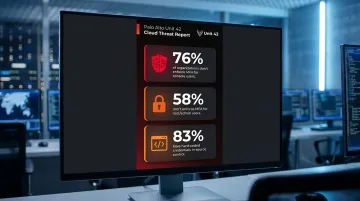
An IAM audit reviews user roles, service accounts, and permissions for over-privilege. It checks MFA enforcement, evaluates RBAC configurations, and identifies privilege escalation paths.
Network Security and Segmentation
Misconfigured security groups and unrestricted inbound/outbound rules remain a leading cause of unauthorized cloud access. Network security evaluation covers:
- Firewall rule analysis and VPC configuration review
- Checks for publicly exposed services and open ports
- Traffic monitoring configurations
- Inter-service communication controls
More than 31% of cloud breaches involve misconfiguration and manual errors, according to SentinelOne's cloud incident research. What compounds the problem: even when issues are detected, 60% of organizations take longer than four days to resolve them (Unit 42).
Data Protection and Encryption
Data protection assessment covers how sensitive data is secured at every stage of its lifecycle:
- Encryption standards at rest (AES-256) and in transit (TLS)
- Key management practices and rotation policies
- Data classification policies and access controls
- Backup integrity and secure deletion procedures
For organizations under GDPR, HIPAA, or PCI DSS, encryption validation isn't optional — regulators treat it as a direct audit requirement.
Vulnerability Management and Penetration Testing
Automated vulnerability scanners catch known CVEs and surface-level misconfigurations. They don't catch everything. Unit 42 found that 63% of production codebases contain unpatched vulnerabilities rated high or critical — suggesting that scanning results often don't translate into action.
More critically, automated tools miss:
- Business logic vulnerabilities (flaws in application workflows)
- Chained attack paths combining multiple misconfigurations
- Cloud-native IAM privilege escalation techniques
- Context-dependent risks that require attacker intuition to find
Manual penetration testing fills that gap. Engineers test API security, container and serverless workloads, and conduct hands-on exploitation attempts that confirm real-world impact — not just theoretical risk.
Compliance and Incident Response Readiness
Assessments validate whether security controls actually map to the frameworks organizations claim to meet — SOC 2, ISO 27001, GDPR, HIPAA. This involves reviewing audit log completeness, SIEM integration, and alerting configurations.
Incident response readiness is a separate — and often overlooked — part of this picture. While 99% of organizations have a formal IR plan, 73% of leaders say they couldn't fully execute it under real attack conditions (TechTarget). Assessments should include simulated response exercises that test whether plans hold up under pressure, not just on paper.
How to Conduct a Cloud Infrastructure Security Assessment: Step-by-Step
The six stages below represent how a thorough assessment runs in practice — and where teams most commonly make mistakes.
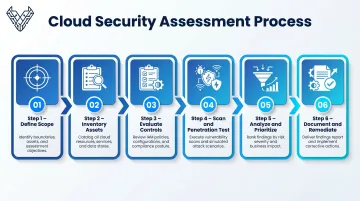
Step 1 – Define Scope and Objectives
Identify which environments, accounts, services, and workloads fall within the assessment boundary. Align scope with business criticality (production vs. staging), regulatory obligations, and recent infrastructure changes.
Common mistake: Scoping too narrowly — assessing a single account while leaving shadow IT assets, orphaned integrations, and legacy systems untouched.
Step 2 – Inventory Cloud Assets
Conduct a full discovery of all cloud resources: virtual machines, containers, serverless functions, databases, storage buckets, APIs, IAM roles, and network components. Tag each asset by sensitivity, owner, and exposure level.
Common mistake: Relying on billing data or partial inventories. Unmanaged assets and accounts created outside formal provisioning processes are frequently missed — and frequently exploited.
Step 3 – Evaluate Security Controls and Configurations
Review IAM policies, firewall rules, encryption settings, logging configurations, and patch levels across all in-scope assets. Compare against CIS Benchmarks, NIST CSF 2.0, or the CSA Cloud Controls Matrix (CCM v4.1) as reference baselines.
Where teams go wrong: Treating this as a one-time snapshot. Configuration drift between assessments silently reintroduces vulnerabilities — making continuous monitoring or scheduled re-evaluation essential.
With controls evaluated, the next step is validating whether those controls actually hold under real attack conditions.
Step 4 – Conduct Vulnerability Scanning and Manual Penetration Testing
Run automated scans to identify known CVEs and exposed services. Follow with manual penetration testing to validate findings, test attack chains, and identify business logic flaws that tools cannot detect.
Common mistake: Presenting automated scan results as the complete assessment. A skilled tester will find exploitable chains and contextual risks that no scanner will flag.
What the scanner surfaces and what a tester confirms are two different things — and the gap between them is where the real risk lives.
Step 5 – Analyze Findings and Prioritize Risks
Correlate scan results and manual test findings against business impact. Prioritize by exploitability, asset sensitivity, and blast radius — not raw CVSS score alone.
Common mistake: Ranking by technical severity only. A medium-severity misconfiguration on a public-facing production database is far more urgent than a high-severity issue on an isolated dev instance with no sensitive data.
Step 6 – Document Findings and Build a Remediation Roadmap
Produce a report structured for both technical and executive audiences:
- Executive summary with risk heatmap
- Per-finding details with reproduction steps
- Prioritized remediation plan with assigned owners and timelines
- Compliance mapping to relevant frameworks
- Follow-up reassessment milestones
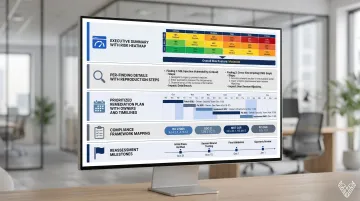
The trap here: Delivering findings without remediation support. An unactioned report means the vulnerabilities stay open — the risk doesn't go away because it's been documented. Assessments should include guidance through remediation, not just discovery.
How Vynox Security Can Help
Vynox Security takes a manual-first, threat-led approach to cloud infrastructure security assessments — built around what automated tools and compliance-only checklists consistently miss. Critical business logic flaws, authorization gaps, and complex attack chains go undetected when organizations rely on scanners that weren't designed to find them.
Their team simulates real attacker behavior across AWS, Azure, and GCP environments — manually testing IAM privilege escalation paths, API logic, cross-cloud data flows, and Infrastructure as Code configurations that automated scanners pass over. Every finding is manually validated, eliminating false positives and directing remediation effort toward real, exploitable risks.
In practice, clients get:
- Manual review of IAM configurations, network segmentation, and storage exposure
- Hands-on API testing and container/serverless workload assessments
- Audit-ready reports mapped to SOC 2, ISO 27001, and GDPR control requirements
- Compliance gap analysis that gives auditors the evidence they need, not just raw findings
- Fast remediation support with less than 24-hour average response time after delivery
Vynox has completed 200+ security assessments for clients ranging from early-stage SaaS startups to mature enterprises, maintaining a 99% client satisfaction rate. Their assessments follow CIS Benchmarks and cloud provider best practices — and because every test is manually validated rather than scanner-driven, findings go deeper into the attack surface than tool-only approaches typically reach.
Vynox stays engaged through remediation — providing clear guidance, answering technical questions, and scheduling re-testing to confirm fixes hold.
Frequently Asked Questions
What is the cloud security assessment process?
The process covers six stages: scoping, asset inventory, security controls evaluation, vulnerability scanning and penetration testing, risk prioritization by business impact, and remediation roadmap documentation. Cloud environments change continuously, so this should run on a regular cycle — not as a one-time exercise.
What is the infrastructure security assessment checklist?
Core checklist items include: asset inventory, IAM and permissions review, MFA enforcement verification, encryption validation (at rest and in transit), misconfiguration scanning, API and third-party integration review, logging and monitoring confirmation, incident response testing, and backup and recovery validation.
What is a cloud security assessment?
A structured evaluation of a cloud environment's security controls, configurations, and vulnerabilities — designed to identify risks, validate compliance posture, and guide remediation across IAM, network security, data protection, and workload configurations.
What are the key features of cloud security?
The five core features are: identity and access management, data encryption at rest and in transit, network security and segmentation, threat detection and monitoring, and compliance and governance controls.
What are the 5 pillars of cloud security?
The five pillars are: identity and access management, data protection, infrastructure security, threat detection and incident response, and compliance and governance. These map to both NIST CSF 2.0 and the AWS Well-Architected Security Framework.
What are the cloud infrastructure assessment tools?
Common categories include CSPM/CNAPP platforms such as Wiz, Prisma Cloud, and Microsoft Defender for Cloud, alongside vulnerability scanners, IAM analyzers, and configuration auditing tools. These tools automate configuration checks and flag known misconfigurations — but they work best alongside manual expert-led testing. Automated scans identify common patterns; human testers surface complex attack chains and logic flaws that tools routinely miss.