

Many security teams apply web app testing logic to thick clients and assume the job is done. It isn't. The majority of the actual attack surface—binary executables, process memory, registry keys, local file storage, and non-HTTP protocols—goes completely untested. The result is a compliance checkbox that doesn't reflect real security.
This article breaks down what thick client penetration testing actually involves: who needs it, why it requires specialized methodology, how each phase works, and what vulnerabilities are most commonly found when manual testing is done properly.
TL;DR
- Thick clients expose a local attack surface—binaries, memory, registry keys, and custom protocols—that web scanners can't touch
- A complete thick client pentest spans five phases, from traffic interception to binary analysis and backend validation
- Common critical findings include hardcoded credentials, DLL hijacking, insecure local storage, and UI-only access controls
- Manual analysis is required—automated scanners can't test binary logic, dump process memory, or intercept non-HTTP traffic
- SOC 2, HIPAA, and ISO 27001 assessments must include desktop applications handling sensitive data
What Is Thick Client Penetration Testing?
Thick client penetration testing is a structured security assessment of desktop applications that perform significant processing on the local machine while communicating with a backend server or database. It covers both the client-side binary and server-side components — attack surfaces that standard web testing tools never reach.
Two Architectures, Different Risk Profiles
OWASP classifies thick client applications into two architectural models, each with distinct risks:
| Architecture | Description | Key Risk |
|---|---|---|
| Two-tier | Client communicates directly with the database server | Database credentials exposed in client memory or config files |
| Three-tier | Client talks to an application server, which queries the database | Adds a layer of separation from the database, but client-side vulnerabilities still apply |
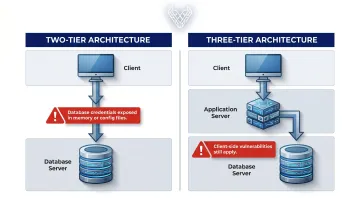
Legacy enterprise software frequently uses two-tier architecture. That direct database exposure makes memory analysis and credential extraction critical parts of any assessment.
How It Differs from Web App Testing
Web application testing works through a browser, with a server doing most processing. Burp Suite intercepts HTTP/S traffic and covers most of the relevant attack surface.
Thick client testing requires a different approach entirely:
- Direct interaction with compiled executables
- Memory analysis of running processes
- Registry and local file system inspection
- Non-HTTP protocol interception requiring additional tooling
- Authorization logic embedded in the binary itself, not enforced server-side
Each of these areas demands specific tools and manual analysis — which is why the methodology for thick client assessments looks substantially different from a typical web engagement.
Why Thick Clients Require Specialized Security Testing
The local execution model changes everything. When an application runs on the user's machine, a WAF provides zero protection. Server-side validation only covers the fraction of logic that actually reaches the server.
The Proxy-Aware vs. Proxy-Unaware Problem
One of the first complications testers encounter is traffic interception. Not all thick clients route traffic through a system proxy:
- Proxy-aware clients (Outlook, many enterprise apps): can be redirected through Burp Suite directly
- Proxy-unaware clients (Spotify, Zoom, many custom tools): require Echo Mirage for TCP traffic, MITM relay setups, or full packet capture via Wireshark
Automated scanners have no mechanism to handle proxy-unaware applications—which means setup for each tool must be handled manually, configured to match that application's specific protocol stack.
Compliance Requires It
Regulatory frameworks are increasingly explicit about desktop application scope:
- HIPAA: HHS guidance on risk analysis requires identifying all ePHI systems and reasonably anticipated threats—desktop tools that create, receive, or transmit ePHI are in scope
- SOC 2 and ISO 27001: Require security assessments of all applications handling sensitive data, including installed desktop software
Organizations that submit automated scan results for thick client coverage risk both compliance gaps and real, undetected exposure. Manual-first assessments provide the depth auditors require—and that genuine security demands. Vynox Security's thick client engagements are scoped specifically to satisfy this standard.
Thick Client Penetration Testing Methodology
A structured thick client assessment follows five phases. Each builds on findings from the previous one: what's discovered in binary analysis often directs where to look in memory, while network findings shape what to probe on the backend.
Phase 1: Information Gathering
Before any testing begins, map the full scope:
- Application architecture (two-tier vs. three-tier)
- Development language and runtime—use CFF Explorer, Detect-It-Easy, or PEiD to identify .NET, Java, or native C/C++ binaries
- All network communication endpoints
- Authentication model (local credentials, domain auth, smart cards)
- User roles and hidden functionality accessible only to admin accounts
Navigating the application with multiple user roles is critical. Admin accounts frequently expose functionality not visible to standard users, and that functionality is often unprotected.
Phase 2: Network Traffic Analysis
The goal is to intercept and analyze every communication channel between the client and backend systems. For proxy-aware clients, route traffic through Burp Suite or OWASP ZAP. For proxy-unaware clients, use Echo Mirage for TCP traffic, set up a MITM relay for custom protocols, and run Wireshark for full packet capture.
Key findings to look for:
- Cleartext credentials transmitted over the wire
- Missing or broken TLS certificate validation (does the app accept self-signed certs?)
- Hardcoded API keys visible in traffic
- Session token randomness and replay attack possibilities
- Sensitive data sent over non-encrypted channels
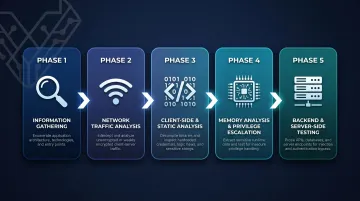
Phase 3: Client-Side and Static Analysis
Binary analysis: Decompile or disassemble the application using dnSpy (.NET), JD-GUI (Java), or Ghidra / IDA Pro (native code). Search for hardcoded credentials, API keys, database connection strings, encryption key material, and debug functionality that developers forgot to remove.
File system analysis: Attach Process Monitor and track every file the application reads and writes. Check:
- AppData and ProgramData directories
- Registry keys (especially for stored credentials or connection strings)
- Temp directories for sensitive data written during operation
- File and directory permissions (can a low-privileged user read or write these paths?)
Phase 4: Memory Analysis and Privilege Escalation Testing
Memory analysis: Attach x64dbg, WinDbg, or Process Hacker to the running process. Dump memory and search for passwords, session tokens, and database connection strings that exist in plaintext in RAM. Two-tier architecture apps are especially exposed here — database credentials must exist somewhere in the process at runtime, making memory dumps a reliable source of critical finds.
Privilege escalation checks:
- DLL hijacking: Run Process Monitor with a "NAME NOT FOUND" filter to identify DLL load attempts from insecure paths. A malicious DLL placed in the right directory gets loaded instead of the legitimate one
- Unquoted service paths: Standard Windows privilege escalation vector
- Update integrity: Are update packages cryptographically signed and verified before execution? Unsigned updates are a reliable code execution path
Real-world CVEs confirm this risk. CVE-2023-29445 documents DLL hijacking in PTC Kepware products with a CVSS score of 7.8 HIGH, enabling privilege escalation to SYSTEM.
Phase 5: Backend and Server-Side Testing
Thick clients have server-side components that must be tested independently of the client binary:
- Extract database connection strings from binary or memory; verify they use least-privilege accounts
- Test all input fields and API parameters for SQL injection and OWASP Top 10 vulnerabilities
- Verify that authorization decisions are enforced server-side, not only in the UI
- Test for insecure deserialization and broken access control in backend APIs
Many teams test only the server-side component and call it a thick client assessment. That approach misses everything in Phases 1–4, which typically contain the most critical findings.
Common Thick Client Vulnerabilities
Hardcoded Credentials (CWE-798)
Database passwords, API keys, and encryption keys embedded directly in binaries or configuration files. Testers extract these using string analysis tools and decompilers. CWE-798 defines this as the product containing hard-coded credentials — and in thick clients, these are extractable without special privileges. Impact: complete backend compromise and lateral movement.
Insecure Local Storage (CWE-312, CWE-922)
Authentication tokens, session data, and sensitive business records cached in local files, registry keys, or temp folders — without encryption. Any application or low-privileged local user with file system access can read this data directly. This is one of the most consistently found vulnerability classes in thick client engagements.
DLL Hijacking (CWE-427)
Windows DLL search order causes applications to look for DLLs in multiple directories in sequence. If any directory in that path is user-writable, an attacker can place a malicious DLL that the application loads instead of the legitimate one. Per Microsoft's DLL security guidance, this frequently enables local privilege escalation — especially when the application runs with elevated rights.
Weak or Missing Cryptography (CWE-327)
Thick clients commonly implement outdated algorithms — DES, MD5, RC4 — or custom encryption schemes that provide little actual protection. Testers identify crypto API calls during static analysis and evaluate key storage practices. Encrypted data protected by broken algorithms is effectively cleartext.
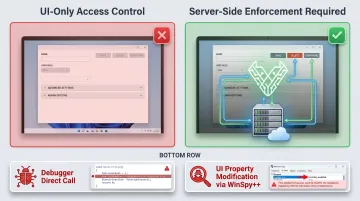
Broken Access Control at the UI Layer (CWE-284)
Many thick clients implement authorization exclusively through UI controls — disabled buttons, hidden menus, grayed-out options — while the underlying functionality remains unrestricted. Testers bypass these controls by:
- Calling restricted functions directly via a debugger
- Modifying UI object properties with tools like WinSpy++ or Windows Enabler
If the server doesn't enforce the same restrictions, those UI controls are security theater.
Business Logic Flaws
No automated tool can detect these. Common examples include:
- Payment manipulation and transaction tampering
- Privilege escalation between user roles
- License validation bypass through binary patching
These consistently rank among the highest-impact findings in an engagement — and they're only catchable through manual, threat-led testing.
When Automated Testing Falls Short
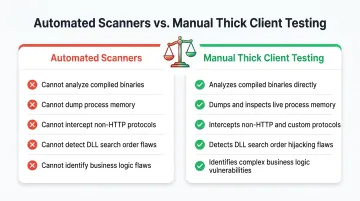
NIST SP 800-115 frames technical security testing as exercising systems through both manual and automated means. For thick clients, automated tools can supplement—but cannot replace—manual analysis.
The fundamental limitation: automated scanners were built for HTTP-based web applications. They cannot:
- Analyze compiled binary executables
- Dump and search process memory
- Intercept non-HTTP protocols
- Identify DLL search order vulnerabilities
- Detect business logic flaws embedded in application code
The most common misconception is that running a web application pentest against a thick client's API endpoints counts as a complete assessment. It tests only the server-side component. DLL hijacking, hardcoded credentials, insecure local storage, memory exposure, and every other client-side vulnerability go untouched — often the most critical findings in a thick client engagement.
A full thick client assessment is most urgent in these scenarios:
- Before production deployment (fixes are far cheaper pre-release)
- After major feature updates that expand the attack surface
- During annual SOC 2 or ISO 27001 review cycles
- Following any security incident involving a desktop application
This depth of coverage — binary analysis, memory forensics, business logic review, and backend validation — requires a provider whose methodology is purpose-built for thick clients, not adapted from a web testing playbook. Vynox Security's assessments cover each of these layers, with every finding manually validated before delivery.
Conclusion
Thick client penetration testing operates on a different plane than web application testing. The methodology covers binary analysis, memory forensics, network interception, and server-side validation — each requiring specialized tools and manual expertise that standard web testing workflows simply don't include.
That complexity is exactly why organizations running desktop applications with sensitive data can't rely on generic assessments. Attackers who understand thick client attack surfaces will find what automated tools miss — and they won't wait for your next audit cycle to do it.
A thorough thick client engagement typically covers:
- Binary and code analysis to surface logic flaws and hardcoded secrets
- Memory inspection to catch runtime credential exposure
- Traffic interception across both network and IPC channels
- Server-side validation to confirm the backend enforces what the client assumes
Compliance requirements may drive the initial engagement, but what you get back is an honest picture of how the application behaves under adversarial conditions — not just a checklist.
Frequently Asked Questions
What is thick client penetration testing?
It's a security assessment targeting desktop applications that process data locally, covering both client-side components (binary, memory, local storage, registry) and server-side components (APIs, databases). It uses specialized tools and manual techniques that go well beyond standard web app testing.
What does "thick client application" mean?
A thick client (also called a fat client or rich client) is a desktop program that performs significant processing on the local machine rather than relying entirely on a server. Examples include ERP software, trading platforms, and healthcare desktop tools that connect periodically to a backend.
What is the difference between a thick client and a thin client?
A thin client relies on a server for almost all processing and simply renders output, like web browsers or virtual desktop clients. A thick client runs business logic, stores data, and processes information locally, making security dependent on both local and server-side controls.
What is an example of a thick client?
Microsoft Outlook, Spotify, Skype, enterprise ERP systems, banking trading terminals, and healthcare record management software all qualify. Any installed desktop application that connects to a backend server is a thick client.
What is a common security issue in thick client applications?
Hardcoded credentials embedded in the binary and insecure local storage of sensitive dataare among the most frequently discovered vulnerabilities. Cleartext passwords and connection strings stored in config files are common examples, and both can lead directly to backend compromise.
How do you test the security of a thick client application?
Testing follows a structured sequence:
- Map the application architecture and identify entry points
- Intercept network traffic using Burp Suite (HTTP) or Echo Mirage (TCP)
- Decompile the binary for static code analysis
- Dump process memory to surface exposed credentials
- Test for DLL hijacking and privilege escalation
- Validate backend APIs against OWASP Top 10 vulnerabilities