Introduction
Mobile apps now handle everything from banking credentials to health records — and most organizations ship them without ever validating whether they can withstand a real attack. That gap is expensive. NowSecure's benchmark analysis found more than 85% of mobile apps contain at least one security vulnerability, and the average cost of a data breach reached $4.88 million in 2024.
Mobile application penetration testing is the structured process of finding those vulnerabilities before someone exploits them. The term gets used loosely, though — conflated with automated scanning, compliance audits, or whatever the app store review happens to surface.
This guide covers what mobile app penetration testing involves: what gets tested, how the process works, which frameworks guide it, and when it genuinely makes sense to use it.
TL;DR
- Over 85% of mobile apps contain exploitable vulnerabilities — and most go undetected in production
- Mobile app pentesting manually validates exploitability, not just the presence of known signatures
- OWASP MASTG and MASVS v2.0 define the industry-standard framework for mobile app security testing
- Automated tools consistently miss business logic flaws, chained attacks, and broken access control
- Passing App Store review does not mean your app is secure — it means it met policy requirements
What Is Mobile Application Penetration Testing?
Mobile application penetration testing is a structured, adversarial security assessment of an iOS or Android application. Trained testers attempt to identify and exploit vulnerabilities the way a malicious actor would — with the goal of exposing weaknesses before they can be used against real users.
The outputs matter as much as the process. A quality engagement produces:
- A prioritized list of confirmed, exploitable vulnerabilities
- Proof-of-concept evidence showing how each vulnerability can be exploited
- Business impact context explaining what a successful attack would cost the organization
- Concrete remediation guidance developers can act on immediately
This is fundamentally different from automated scanning, which generates findings without validating whether they're actually exploitable or what their real-world impact would be.
How It Differs from Adjacent Processes
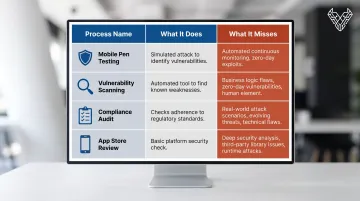
| Process | What It Does | What It Misses |
|---|---|---|
| Mobile pen testing | Simulates real attacks, validates exploitability | Depends on tester skill and scope definition |
| Vulnerability scanning | Identifies known vulnerability signatures | Business logic flaws, chained attacks, false positive filtering |
| Compliance audit | Verifies adherence to a checklist | Adversarial validation, real exploitability |
| App store review | Checks policy compliance and malware | Application-level security flaws entirely |
Mobile pen testing is also distinct from web application testing. The attack surface is different: it includes platform sandboxing, app store distribution constraints, mobile OS permission models, and device-level storage — none of which appear in a standard web assessment.
Why Mobile App Penetration Testing Matters
The Risk Is Real and Growing
More than 85% of mobile apps are vulnerable to security issues. Zimperium's 2024 Global Mobile Threat Report found over 87,000 malware samples detected per month, with an 80% increase in spyware on enterprise devices year-over-year.
Mobile apps are high-value targets because they aggregate sensitive data — credentials, payment details, health records, session tokens — and communicate with backend APIs that often have weaker controls than the app itself. When a vulnerability is discovered post-launch, remediation is slow. App store update cycles, user adoption lag, and backend coordination all extend the window of exposure.
The Compliance Angle
Testing isn't just good practice. Several frameworks either require or strongly imply it:
- PCI DSS 4.0: Explicit requirement for apps that handle cardholder data (Requirements 6.2 and 6.3)
- GDPR Article 32: Requires "regularly testing, assessing and evaluating the effectiveness of technical and organisational measures"
- SOC 2: Principles-based; penetration testing is the widely accepted method to demonstrate control effectiveness
- HIPAA: Requires risk analysis for apps handling electronic protected health information
- ISO 27001: Annex A controls address secure development; pen testing demonstrates compliance
Organizations that skip mobile app testing tend to discover this compliance gap during an audit, not on their own terms. That's a costly way to find out. Manual-first penetration testing — rather than tool-only scanning — is what actually surfaces the business logic flaws these frameworks are designed to catch.
How Mobile Application Penetration Testing Works
Well-structured mobile app pentests follow a defined methodology guided by OWASP MASTG (Mobile Application Security Testing Guide) and MASVS v2.0 (Mobile Application Security Verification Standard). MASVS defines what to verify; MASTG defines how to test it — together they provide a complete, NIST-recognized framework for mobile security assessment.
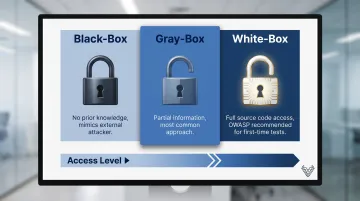
The testing approach you choose shapes how deep that framework gets applied:
- Black-box: No prior knowledge — mimics an external attacker
- Gray-box: Partial information (credentials, some documentation) — the most common approach
- White-box: Full source code and architecture access — OWASP recommends this for apps not previously tested
Step 1: Scoping and Reconnaissance
Testers define what's in scope: app versions, platforms, features, and user roles. They gather information about the app's architecture, backend endpoints, and exposed data sources — without yet attacking. This mirrors what a real attacker would learn before engaging.
Step 2: Static and Dynamic Analysis
Two complementary approaches run in parallel:
Static analysis : examining the app binary, decompiled code, configuration files, and hardcoded strings without executing the app. Tools include MobSF (cross-platform), jadx (Android decompilation), and Ghidra or Hopper for iOS binaries.
Dynamic analysis : running the app in a controlled environment, intercepting network traffic with Burp Suite, and using Frida for runtime instrumentation. This exposes vulnerabilities that only appear during actual execution — certificate validation failures, insecure session handling, and runtime data exposure.
Step 3: Exploitation and Manual Testing
This is the adversarial core of the engagement. Testers attempt to exploit identified vulnerabilities using attack techniques tailored to the app:
- Bypassing authentication controls and session management
- Extracting sensitive data from local storage
- Manipulating inter-process communication
- Exploiting unauthenticated or improperly authorized API endpoints
- Bypassing platform protections like certificate pinning and root/jailbreak detection
Manual testing at this stage is what separates pen testing from scanning. Business logic flaws, chained vulnerabilities, and privilege escalation paths don't appear in automated output — they require a tester who understands how the application is supposed to work and can identify where that logic can be abused.
Step 4: Reporting and Remediation Support
A quality report includes more than a list of findings. Each confirmed vulnerability should have:
- Clear description and severity rating
- Proof-of-concept demonstrating exploitability
- Business impact context
- Specific, prioritized remediation steps
Post-report support matters too. Vynox Security structures engagements to include debrief sessions and developer Q&A, so your team understands not just what was found but how to fix it. Retesting after remediation confirms vulnerabilities are properly resolved — and reports are delivered in under 48 hours, ready for auditors or compliance reviews.
What Gets Tested in a Mobile App Pentest
Source Code and Binary Protections
Testers examine whether the app's code can be reverse-engineered, whether sensitive values (API keys, tokens, credentials) are hardcoded, and whether binary protections against tampering are present. Android APKs and iOS IPA files require platform-specific tooling — jadx for Android decompilation, Hopper or Ghidra for iOS Mach-O binaries.
Authentication, Authorization, and Session Management
Testers attempt to bypass login controls, escalate privileges between user roles, hijack active sessions, and exploit missing authentication on sensitive functions. This maps to OWASP Mobile Top 10 categories M1 (Improper Credential Usage) and M3 (Insecure Authentication/Authorization).
Local Data Storage
How an app stores sensitive data on-device is a consistent weak point. Testers check each storage location for unencrypted data, cross-app accessibility, and data that persists after app deletion — mapping to M9 (Insecure Data Storage):
- Shared preferences
- SQLite databases
- Temporary and cache files
- iOS Keychain entries
API and Backend Communication
Testers intercept and manipulate traffic between the app and its backend to identify:
- Missing or bypassable certificate pinning
- Insufficient transport layer security
- Unauthenticated or improperly authorized endpoints
- Data leakage in API responses
- Undocumented shadow APIs
Android vs. iOS Platform Differences
Android and iOS require distinct testing approaches:
| Area | Android | iOS |
|---|---|---|
| Distribution | APK sideloading enabled | Requires developer profile or jailbreak |
| IPC attack surface | Intents, content providers | XPC services, URL schemes |
| Storage | Shared preferences, external storage | Keychain, sandboxed containers |
| Binary format | DEX/APK | Mach-O/IPA |
| Key test focus | Intent hijacking, content provider exposure | Keychain security, code signing, entitlements |
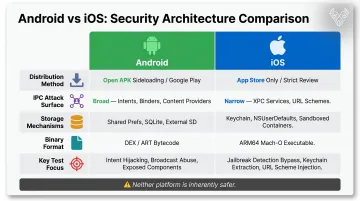
Android's open sideloading model exposes a broader IPC attack surface, while iOS's tighter controls shift focus to entitlement misconfigurations and Keychain weaknesses. Neither platform is inherently safer — both carry exploitable risk when tested correctly.
Common Misconceptions About Mobile App Penetration Testing
"Automated scanning covers what we need"
OWASP explicitly states that business logic vulnerabilities "can't be scanned for automatically" because they involve legitimate use of application functionality. Automated tools check for known vulnerability signatures — SQL injection patterns, known CVEs, misconfigured headers. They cannot reason about whether a payment flow can be manipulated, whether a privilege boundary can be crossed by combining two legitimate API calls, or whether an authorization check is missing in a feature that looks functional on the surface.
Vulnerability classes that tool-only approaches consistently miss include:
- Broken access control and insecure direct object references
- Logic bypasses in purchase, authentication, or approval flows
- Authorization gaps in features that appear functional on the surface
Vynox Security was built specifically around this gap. Its founders repeatedly saw organizations receive clean automated scan results while carrying exploitable vulnerabilities that only manual review would surface.
"Our app passed App Store review, so it's secure"
App store review is a policy compliance process, not a security assessment. Apple checks for malware, guideline violations, and inaccurate descriptions. Google Play scans for known malware signatures. Neither performs penetration testing or validates application-level security.
Despite Apple's review process, 110,000 iOS apps were found to contain hardcoded secrets. An app can be fully approved, widely distributed, and still carry exploitable vulnerabilities in its authentication logic, API layer, or data handling.
"We only need to test once at launch"
Mobile apps change continuously. New features add attack surface. Third-party libraries accumulate known vulnerabilities over time. Backend changes can break security assumptions that were valid at launch. A single test at release captures a snapshot — it doesn't account for what the app becomes six months later.Retesting after major releases and at minimum annually is the practical standard.
When Mobile App Penetration Testing May Not Be Appropriate
Not every situation calls for a full pentest. Two scenarios where the investment often doesn't deliver full value:
The app isn't built yet. Penetration testing validates what's already built. If architecture decisions are still being made, threat modeling is the better investment — it identifies design-level risks before they're embedded in code.
The two activities are complementary, not interchangeable. Threat modeling informs how the app should be built; penetration testing confirms how securely it was.
The team has no capacity to act on findings. A penetration test report without remediation produces no security improvement. If development bandwidth is constrained to the point where a detailed findings report can't be prioritized, the timing isn't right. Testing works best when development teams can move on findings within a reasonable window.
There's also a pattern worth naming: organizations that scope tests narrowly to satisfy a compliance checkbox — testing only one feature, or explicitly excluding high-risk areas — often end up with a report that passes an audit but leaves substantial risk in place. Test coverage needs to match the actual attack surface, not what's comfortable to expose.
Frequently Asked Questions
How do you perform mobile application penetration testing?
The process runs from scoping through static and dynamic analysis, manual exploitation, and a prioritized remediation report. Gray-box or white-box access (credentials and optionally source code) significantly improves depth and coverage compared to black-box assessments.
Can mobile application penetration testing be done remotely?
Yes. Most mobile app penetration testing is performed entirely remotely. Testers work with APK or IPA files, test environment access, and credential sets provided by the client. Physical device access is rarely necessary for standard assessments.
What is mobile application penetration testing?
It's a simulated attack-based security assessment of an iOS or Android application, designed to find and validate exploitable vulnerabilities across code, APIs, authentication, data storage, and platform-specific behaviors — before real attackers do.
What is the MSTG and how does it relate to mobile app penetration testing?
The OWASP Mobile Security Testing Guide (MASTG) is the industry-standard methodology for mobile app security testing. It provides test cases, techniques, and checklists used to evaluate apps against the MASVS security standard — keeping coverage consistent and measurable across engagements.
What are the best mobile application penetration testing tools?
Core toolset: Burp Suite (traffic interception), Frida and Objection (runtime instrumentation), MobSF (static/dynamic analysis), jadx (Android decompilation), Ghidra or Hopper (iOS reverse engineering). All of these tools support manual testing by experienced practitioners — they don't substitute for it.
Organizations looking to assess their mobile app's security posture can reach out to Vynox Security for a manual-first, threat-led assessment built around the app's specific architecture and risk profile.