

Introduction
Most organizations invest in web application penetration testing — then struggle to make sense of what comes back. The test itself isn't the hard part. Acting on the report is.
A web application penetration testing report is the formal document delivered at the end of a security assessment that translates technical exploitation findings into prioritized, evidence-backed remediation guidance. It's the artifact that separates a meaningful security investment from an expensive exercise.
This guide is written for developers, security leads, CTOs, and compliance teams at startups, SaaS companies, and mature organizations. Whether you're reading your first report or auditing your vendor's deliverable quality, what follows covers what belongs in a quality report, how to act on it, and what most teams get wrong.
Without a clear, actionable report, even the most thorough test produces nothing more than an expensive PDF.
TL;DR
- A web app pen test report documents every exploitable vulnerability, how it was attacked, the potential business impact, and how to fix it.
- It serves two audiences: executives need risk summaries, engineers need step-by-step reproduction and fix guidance.
- Expect six core sections: executive summary, scope and methodology, OWASP/CWE-mapped findings with evidence, risk ratings, remediation steps, and appendices.
- Remediation requires triage by business impact, clear ownership, SLA-driven timelines, and a retest to confirm every fix holds.
- Automated scanners cannot replace a pen test report — business logic flaws, attack chains, and context-specific risks require human judgment.
What Is a Web Application Penetration Testing Report?
A web app pen test report is the final deliverable from a controlled, simulated attack against a web application. It covers every vulnerability discovered, how it was exploited, the evidence collected, and the specific fixes recommended. What distinguishes it from a generic security report is its focus on application-layer attack categories: authentication bypass, injection flaws, session manipulation, broken access control, and business logic abuse.
The report's primary purpose is to give the organization a clear, prioritized picture of where their application is exploitable right now — mapped to real-world attacker behavior — so engineering and security teams can act immediately.
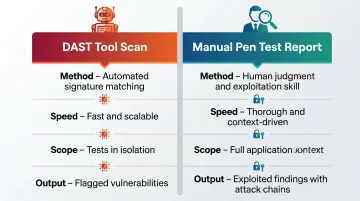
How It Differs from a DAST Scan
This distinction matters more than most organizations realize.
| DAST Tool Scan | Manual Pen Test Report | |
|---|---|---|
| Method | Automated signature matching | Human tester applying judgment and exploitation skill |
| Speed | Fast and scalable | Thorough, context-driven |
| Scope | Tests in isolation | Full application context |
| Output | Flagged vulnerabilities | Exploited findings with attack chains |
OWASP WSTG v4.2 defines best practice as producing a formal record that allows another security tester to reproduce results — complete with root cause, testing techniques, evidence, and severity ratings. That standard requires human-led work.
Human-led work matters because automated tools carry false positive rates between 15% and 30% for common vulnerability types. They also cannot chain findings into attack paths or test multi-step business logic flows. A pen test report documents what actually happened when a skilled tester attempted to exploit the application — not just what a scanner flagged.
Vynox Security's manual-first, threat-led methodology was built specifically to surface these gaps — the business logic flaws, authorization bypasses, and multi-step attack chains that automated scans consistently miss.
Why Web Application Security Teams Rely on Pen Test Reports
Web applications are internet-facing, handle sensitive user data, and change constantly through CI/CD pipelines. Vulnerabilities can be introduced with every deployment. A pen test report creates a dated, auditable record of security posture at a specific point in time — a snapshot no continuous scanner can replicate.
Compliance Requirements
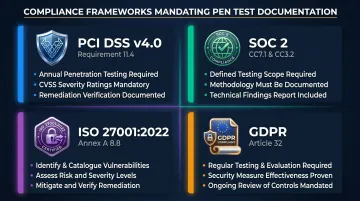
Multiple frameworks require documented evidence of security testing:
- PCI DSS v4.0 Requirement 11.4 mandates a defined, documented penetration testing methodology, internal and external testing at least annually, and retesting after any significant changes. The standard requires CVSS-rated findings and documented remediation verification.
- SOC 2 auditors look for penetration testing reports demonstrating scope, methodology, and technical findings as evidence for controls including CC7.1 (system operations) and CC3.2 (vulnerability identification).
- ISO 27001:2022 Annex A Control 8.8 requires organizations to identify, assess, and mitigate technical vulnerabilities — with ISO 27002:2022 explicitly recommending penetration testing as a validation method.
- GDPR Article 32(1)(d) mandates "a process for regularly testing, assessing and evaluating the effectiveness of technical and organisational measures for ensuring the security of the processing."
Auditors don't accept verbal assurances. They need dated reports, documented scope, and evidence of remediation — which is exactly what a formal pen test report provides.
What Happens Without a Formal Report
Without a formal report, findings stay in the tester's notes. The downstream consequences are predictable:
- Developers receive no actionable guidance
- The same vulnerabilities reappear in the next release cycle
- The organization cannot demonstrate security due diligence to auditors
- Unresolved web app vulnerabilities feed real breaches — not just theoretical risk
The stakes are measurable. According to the Verizon 2025 DBIR, exploitation of vulnerabilities as an initial access vector hit 20% — a 34% year-over-year increase — with web applications ranking among the top two action vectors in confirmed breaches.
Key Sections Every Web App Pen Test Report Should Include
A pen test report is only as useful as its structure. The sections below cover industry-standard components — aligned with OWASP WSTG and PTES — so both your security team and your executives can act on findings without digging for context.
Executive Summary
Written for non-technical stakeholders. This section should cover:
- Testing date range and overall risk posture
- Count of critical, high, medium, and low findings
- The most business-impacting vulnerabilities in plain language
- High-level remediation recommendations
Keep it to one or two pages. Avoid jargon. This is the section executives use to allocate remediation resources — it needs to answer "what's broken and what does it cost us if exploited?" not "how does the exploit work."
Scope, Methodology, and Rules of Engagement
This section documents:
- Which application URLs, API endpoints, authenticated roles, and environments were tested
- Which methodology was followed (OWASP WSTG v4.2, PTES, NIST SP 800-115)
- Any exclusions, constraints, or out-of-scope boundaries
Vynox Security's engagements align with OWASP Top 10, OWASP ASVS, and NIST guidelines.
This section protects both parties legally and gives readers the context needed to interpret findings accurately. A finding on an out-of-scope endpoint reads differently than one on the payment flow.
Findings and Evidence
The technical core of the report. Each finding must include:
- Vulnerability title and description
- Affected endpoint or component
- Proof-of-concept evidence (HTTP request/response pairs, screenshots, or exploit payloads)
- Step-by-step reproduction instructions
- OWASP Top 10 and CWE classification
- Tester's assessment of exploitability and business impact
Evidence quality determines report credibility. An unproven finding is a suggestion, not a validated risk. Vynox Security manually validates every finding to eliminate false positives, with each backed by proof-of-concept and impact analysis.
Risk Ratings and Prioritization
Most reports use CVSS as a baseline, but raw scores mislead. FIRST.org's CVSS v4.0 specification explicitly states that a Base score alone "does not account for the specific security controls or the relative importance of a system within a particular organization's unique infrastructure."
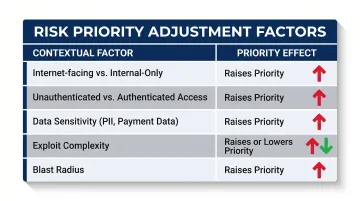
Context must adjust the score:
| Factor | Effect on Priority |
|---|---|
| Internet-facing vs. internal-only | Raises priority |
| Unauthenticated vs. authenticated access | Raises priority |
| Data sensitivity (PII, payment data) | Raises priority |
| Exploit complexity | Lowers or raises priority |
| Blast radius | Raises priority |
Include a findings summary matrix — severity vs. affected asset vs. exploit complexity — so teams can triage without reading every full finding first.
Remediation Recommendations and Retesting
Every finding needs a specific fix recommendation, not a generic one. "Parameterize all SQL queries using prepared statements for the user login endpoint" is actionable. "Fix SQL injection" is not.
Each recommendation should include:
- The specific fix, mapped to the affected technology stack
- An assigned owner (team or individual)
- An SLA tier based on severity
After remediation, findings are retested and updated to one of three statuses: verified-fixed, partially remediated, or risk-accepted (with documented business justification). Vynox Security works closely with client teams to validate fixes and confirm closure before marking findings complete.
Appendices
Supporting artifacts that would clutter the main report. Common appendix items include:
- Full tool outputs and raw scanner logs
- Raw HTTP request/response logs
- Network or application architecture diagrams
- Engagement change log
These serve audit and reproducibility purposes. Reference them from specific findings — don't leave them as standalone data dumps.
How to Read and Act on a Web App Pen Test Report
By Audience
- Executives: Focus on the executive summary. Understand risk exposure, data at stake, and compliance gaps. Use it to prioritize remediation resources.
- Engineers: Work through the findings section systematically. Use proof-of-concept steps to reproduce and understand each vulnerability before writing a fix.
- Security leads: Own the triage process, track remediation progress, and manage risk-accepted findings with documented justification.
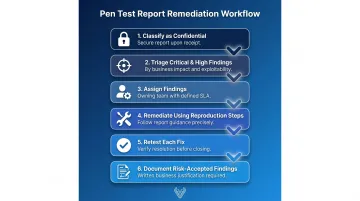
The Remediation Workflow
- Classify the report as confidential immediately upon receipt — it contains detailed exploitation instructions
- Triage critical and high findings by business impact and exploitability, not just CVSS score
- Assign each finding to the owning team with a clear SLA
- Remediate using the report's reproduction steps — don't guess at root causes
- Retest each fix before closing it; partial fixes can leave residual risk
- Document risk-accepted findings with written business justification
Remediation SLAs and KPIs
Industry guidance tiers (calibrate these to your own risk context):
- Critical: 24–72 hours to begin remediation
- High: 15–30 days
- Medium: 30–90 days
- Low: 90 days
Edgescan's 2024 Vulnerability Statistics Report shows actual MTTR for critical web application findings averages 35 days — well beyond what most SLA targets allow. Useful KPIs include:
- Mean Time to Remediate (MTTR) for critical and high findings
- Percentage of critical findings closed within SLA
- Recurrence rate of the same vulnerability class across consecutive tests
- Overall risk score change between test cycles
Feeding Findings Back into Development
Route findings into your engineering ticketing system (Jira, Linear, etc.) rather than a separate security silo. This keeps remediation visible and accountable alongside other engineering work. To make the most of each report:
- Brief developers on root-cause patterns, not just individual bugs — repeated input validation failures across multiple endpoints signal a training gap, not isolated oversights
- Feed recurring vulnerability classes directly into your secure code review checklists
- Use the report's reproduction steps during internal code reviews to catch similar issues before the next test cycle
Common Misconceptions About Web App Pen Test Reports
"A DAST scan is equivalent to a pen test report"
It isn't. Automated tools identify known vulnerability signatures. They cannot:
- Chain findings into exploitable attack paths
- Test multi-step business logic flows (price manipulation, account takeover via logic abuse)
- Validate whether a flagged issue is actually exploitable in the specific application context
Business logic vulnerabilities — which DAST tools structurally cannot detect — account for approximately 3% of all vulnerabilities reported through the HackerOne platform, and they often represent disproportionate real-world risk.
"Prioritize by CVSS score"
Teams that sort purely by CVSS base score often fix lower-impact findings first because they score higher in isolation. A critical authentication bypass on a low-traffic staging environment can outrank a medium-rated IDOR on a payment flow by raw CVSS. That's the wrong call.
Context — internet exposure, data sensitivity, exploit complexity, blast radius — must override raw scores during triage.
"One annual test is enough"
A pen test report is a point-in-time snapshot. Web applications change continuously — 40,009 new CVEs were published in 2024, a 38% increase over 2023, averaging 108 per day. New features, third-party integrations, and infrastructure updates introduce vulnerabilities between test cycles.
PCI DSS v4.0 requires testing after any significant change, not just annually. Organizations with active CI/CD pipelines should tie testing to release milestones, not the calendar.
"All pen test reports are equivalent"
They aren't. A low-quality report padded with informational scanner findings, generic remediation advice like "apply patches," or findings without proof-of-concept evidence provides little actionable value. Characteristics of a high-quality report:
- Contextual risk ratings adjusted for your environment
- Clear attack chain narratives showing how vulnerabilities connect
- Step-by-step reproduction instructions
- Specific fix guidance tied to the actual technology stack
- Verified evidence for every finding
Frequently Asked Questions
What is a web application penetration test?
A controlled, simulated attack against a web application conducted by a security professional to identify exploitable vulnerabilities before real attackers do. Testing covers authentication, input validation, session management, access control, and business logic — areas where real risk lives.
What is web VAPT?
VAPT (Vulnerability Assessment and Penetration Testing) combines automated scanning to identify known weaknesses with manual exploitation to validate findings and chain them into real attack paths. The output is commonly called a VAPT report.
Are DAST and VAPT the same?
No. DAST is an automated scanning technique that detects known vulnerability patterns at runtime. VAPT includes manual exploitation, attack chain analysis, and business logic testing. DAST output is an input to a VAPT engagement, not a replacement for it.
What are the 7 stages of penetration testing?
The PTES standard defines: pre-engagement/scoping, intelligence gathering, threat modeling, vulnerability analysis, exploitation, post-exploitation, and reporting.
What are the OWASP Top 10?
A community-maintained list of the most critical web application security risk categories — including Broken Access Control, Injection, Insecure Design, and Security Misconfiguration — updated periodically by the OWASP Foundation.
How much does a web application penetration test cost?
Pricing varies based on application complexity, number of endpoints, authenticated roles tested, and whether the engagement includes retesting. Contact Vynox Security at sales@vynoxsecurity.com for a scoped quote based on your specific environment.
Conclusion
A web application penetration testing report converts simulated attack activity into a prioritized, evidence-backed roadmap — telling engineering teams exactly what is broken, how an attacker could exploit it, and what to fix first. How an organization acts on that output determines whether the engagement produces lasting security improvement or just fills a folder.
Organizations that treat the report as a compliance checkbox will remediate the wrong things, miss logic-level risks, and face the same vulnerabilities in the next engagement. Getting the most from a pen test report requires a deliberate approach:
- Understand the report's structure before triaging findings
- Apply contextual risk scoring rather than sorting by severity alone
- Route findings into normal engineering workflows with clear owners
- Retest every fix before closing it out
- Maintain a regular testing cadence to catch regressions
That discipline — not the test itself — is what drives measurable security improvement over time.