Introduction
Web applications are the most consistently targeted entry point in modern cyberattacks—and the attack surface keeps growing as organizations ship features faster than they test them.
The numbers back this up. According to Edgescan's analysis of the Verizon 2025 DBIR, approximately 42% of all exploits specifically target web applications, with 1,387 confirmed data compromises in that category alone. Meanwhile, web application vulnerabilities take an average of 74.3 days to remediate—a 36% longer window than network-layer issues, during which applications remain exposed.
That 74-day gap is where breaches happen. A web application security assessment helps close it before attackers find the opening. This guide covers:
- What a web application security assessment actually is (and how it differs from a basic scan)
- The three main assessment types and when each applies
- A step-by-step breakdown of how assessments work in practice
- A real-world walkthrough showing what automated tools find—and what they miss
TL;DR
- A web application security assessment is a hands-on evaluation of a web app's defenses—going beyond automated scans to find business logic flaws, access control gaps, and exploitable vulnerabilities
- Three main assessment types cover different depths: vulnerability scans, penetration tests, and code reviews
- Assessments follow a defined sequence: scoping, attack surface mapping, vulnerability analysis, risk prioritization, and remediation reporting
- DAST scanners average just 11% detection on benchmark tests—automated tools alone will miss critical vulnerabilities
- Regular assessments support SOC 2, ISO 27001, and GDPR compliance while reducing breach likelihood and cost
What Is a Web Application Security Assessment?
A web application security assessment is the methodical process of evaluating a web application's security posture by uncovering weaknesses, testing controls, and measuring the real-world impact of vulnerabilities. Unlike a simple vulnerability scan — which surfaces known issues without exploitation analysis or business context — an assessment tells you what an attacker could actually do with what they find.
Organizations use assessments across a range of scenarios:
- Pre-launch validation — confirming an application is production-ready before exposure to users
- Compliance audits — satisfying requirements for SOC 2, ISO 27001, PCI DSS, or GDPR
- Post-incident reviews — understanding how a breach or intrusion occurred
- Major feature releases — ensuring new functionality hasn't introduced exploitable flaws
- Cloud migrations — re-evaluating the attack surface after infrastructure changes
The right assessment type depends on where you are in your risk cycle — and that's where the distinctions below matter.
Types of Web Application Security Assessments
Three primary types exist, and the right combination depends on your risk profile, compliance requirements, and application complexity:
| Type | Method | Best For |
|---|---|---|
| Vulnerability Scan | Automated tools | Baseline visibility, fast coverage, routine hygiene |
| Penetration Test | Manual, adversarial simulation | Understanding how far an attacker could go and what they could chain together |
| Code Review | Manual source code inspection | Identifying logic flaws and insecure design patterns tools can't detect |
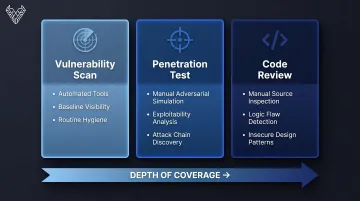
In practice, scans give you coverage, penetration tests show you what's exploitable, and code reviews explain why the flaw exists. Running them in sequence gets you a complete picture rather than isolated snapshots. The OWASP Web Security Testing Guide (WSTG) provides a structured framework covering 11 testing categories, from authentication to business logic.
Why Web Application Security Assessments Are Critical
Compliance Doesn't Equal Security
Passing a compliance audit and being secure are not the same thing. Verizon's Payment Security Report found that at the time of a breach, no organization was fully PCI DSS compliant across all 12 requirements—and only 27.9% of organizations achieved full compliance during interim validation assessments.
Regulations set a floor, not a ceiling. An organization can pass an annual audit and still carry exploitable vulnerabilities introduced the week after the auditor left. That gap between audit-ready and actually secure is where breaches happen.
The Real Business Cost of a Breach
The numbers make the risk tangible. The IBM Cost of a Data Breach Report 2025 puts the global average breach cost at $4.44 million—with U.S. organizations facing a record $10.22 million average.
Beyond direct costs, breaches trigger:
- Regulatory fines — PCI DSS penalties can reach $25,000–$50,000+ per month during non-compliance
- Customer churn — lost trust rarely recovers quickly in competitive markets
- Operational downtime — incident response consumes engineering bandwidth for weeks or months
- Reputational damage — particularly severe for B2B companies whose clients depend on their security posture
Proactive security assessment typically costs a fraction of a single breach response—often less than 1% of the $4.44M average. The math is straightforward.
What Scanners Actually Miss
Automated scanners are useful—but they're not sufficient on their own. Peer-reviewed research by Lavens et al. (2022) tested 24 web vulnerability scanners against the OWASP Benchmark and found DAST tools averaged just an 11% detection score. DAST tools scored 0% on weak cryptography, weak hashing, and weak randomness. Trust boundary violations—closely linked to broken access control—were detected at only 4.4% overall.
Meanwhile, OWASP explicitly identifies business logic vulnerabilities as flaws that "cannot be detected by automated scanners" because they require understanding an application's intended behavior—not just matching known patterns.
How a Web Application Security Assessment Works – Step by Step
What separates a thorough assessment from a checkbox exercise is how each phase is executed—particularly whether manual testing is layered in alongside automated scanning.
Step 1 – Define Scope and Identify Sensitive Data
Before any testing begins, establish:
- Which applications, environments, APIs, and integrations are in scope
- What sensitive data types are processed (PII, credentials, financial records)
- Which compliance frameworks apply and what evidence they require
Scoping too narrowly is where many assessments break down. Leaving out legacy APIs, staging environments, or third-party integrations creates blind spots that attackers will find even if your assessment didn't.
Step 2 – Map the Attack Surface
Attack surface mapping means cataloging every possible entry point: authentication flows, API endpoints, input fields, third-party integrations, admin interfaces, and session management mechanisms. Nothing should be tested in isolation.
Modern web applications have expanded attack surfaces due to microservices, third-party libraries, and cloud infrastructure. Getting this mapping right matters more than ever — a missed integration or undocumented endpoint is often where breaches start.
Step 3 – Conduct Vulnerability Analysis
Vulnerability analysis combines automated and manual methods:
- SAST — analyzes source code without executing the application, catching coding vulnerabilities early
- DAST — tests the running application from the outside, simulating external attack behavior
- SCA — scans open-source dependencies for known vulnerabilities; critical given that 74% of commercial codebases contain high-risk open-source vulnerabilities, a 54% surge year-over-year
- Manual testing — the layer that catches what tools miss: broken access controls, business logic abuse, and chained attack paths
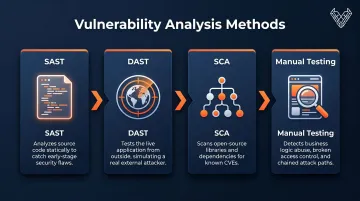
Automated tools have real limits in this phase. A scanner won't detect a workflow that lets a non-admin user reach admin functions through a sequence of legitimate-looking requests — but a skilled tester will.
Step 4 – Assess and Prioritize Risk
Not all vulnerabilities carry equal risk. Severity must be evaluated in context:
- How easy is the vulnerability to exploit?
- What data or functionality does it expose?
- What is the actual business impact if it's leveraged?
A critical CVSS score in an isolated, low-traffic module matters far less than a medium-severity flaw sitting inside a payment flow. The output of this step is a prioritized risk matrix that tells remediation teams exactly where to focus first—not just a list sorted by CVSS score.
Step 5 – Remediate, Retest, and Build a Security Roadmap
Remediation is not the finish line. Fixes must be validated through retesting to confirm vulnerabilities are fully resolved and no new issues were introduced. Without it, a patch that appears complete may only address the surface behavior — not the underlying flaw.
The final deliverable should be a security roadmap outlining:
- Short-term fixes — critical and high-severity issues requiring immediate action
- Medium-term improvements — structural issues and recurring vulnerability patterns
- Long-term investments — architectural changes, secure development training, tooling
Done right, the roadmap gives your team a clear sequence of action — so findings drive change, not just documentation.
Real-World Walkthrough: What a Web Application Security Assessment Looks Like in Practice
Consider a SaaS company handling user account data and payment processing, requesting an assessment before a major product launch.
Scoping establishes that the login flow, checkout APIs, payment integrations, and admin panel are all in scope. Relevant sensitive data includes PII, payment card data, and session tokens.
Attack surface mapping uncovers something the team didn't expect: an undocumented legacy API endpoint still accessible in production—undocumented internally and not flagged for decommission. It immediately becomes a testing priority.
What Automated Tools Find
The scanner run produces legitimate findings:
- An outdated third-party library with a known CVE (medium-high)
- A missing Content Security Policy header—not surprising given that only 21.9% of websites globally deploy CSP (medium)
Useful starting points—but automated tools only surface what matches known signatures.
What Manual Testing Finds
Two critical issues surface only through manual testing:
Discount code replay : a user can resubmit a discount code that was already applied to a previous order. The application validates whether the code exists, not whether it's already been redeemed for that user. Financial impact: real.
Broken access control on order history — a standard user can view another user's order history by incrementing the order ID in the URL. No role check, no ownership validation. Classic Insecure Direct Object Reference (IDOR). PII exposure + compliance risk: critical.

Neither finding matched a known vulnerability signature. Neither scanner detected them.
How Findings Are Prioritized
| Finding | Severity | Rationale |
|---|---|---|
| IDOR on order history | Critical | PII exposure, compliance risk (GDPR/PCI DSS) |
| Discount code replay | High | Direct financial impact |
| Outdated library (CVE) | Medium-High | Known exploit, but limited direct exposure |
| Missing CSP header | Medium | Defense-in-depth gap, lower immediate risk |
What Happens Next
The dev team patches the IDOR flaw and resubmits for retesting within 48 hours—confirmed resolved. The security roadmap flags a recurring theme: IDOR vulnerabilities appear across multiple controllers in the codebase, not just in order history. This triggers a targeted secure code review for the next sprint cycle—addressing root cause, not just the single instance that surfaced during testing. For a company approaching a product launch, that distinction determines whether the same class of vulnerability reappears in three months.
How Vynox Security Can Help
Vynox Security was built specifically to address that gap. The company's founders spent years in application security and penetration testing, watching the same problem repeat: organizations relying on automated scans and compliance checklists that missed real, exploitable risks.
Critical business logic flaws, authorization gaps, and attack chains kept slipping through—leaving teams confident in security that didn't hold up.
What's Included in a Vynox Web Application Assessment
Vynox's assessments follow a four-phase methodology: reconnaissance and threat modeling, manual and automated vulnerability testing, proof-of-concept validation, and remediation-focused reporting. Every finding is manually validated—100% true positive rate, no noise.
Core service components include:
- Manual penetration testing against OWASP Top 10 and beyond
- Business logic analysis targeting application-specific abuse scenarios
- API security testing covering BOLA, mass assignment, improper asset management, and token handling
- SCA scanning for vulnerable open-source dependencies
- Remediation support with an average response time under 24 hours
- Audit-ready reports mapped to SOC 2, ISO 27001, GDPR, and PCI DSS requirements
Why Organizations Choose Vynox
- 200+ assessments completed, 100+ businesses secured, 5,000+ vulnerabilities discovered
- 3× deeper coverage than tool-only scan programs through manual-first methodology
- <48-hour report delivery with findings backed by proof-of-concept and clear remediation guidance
- 99% client satisfaction rate across clients in 50+ countries
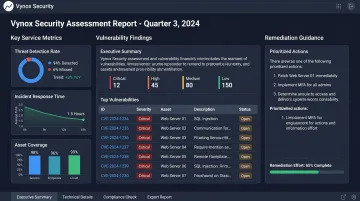
Notessa Inc.'s CTO summarized it directly: "The insights from their detailed reports not only strengthened our systems but also helped us align with SOC 2 compliance requirements."
If your organization needs security testing that reflects how real attackers operate, contact Vynox Security to discuss your assessment scope.
Frequently Asked Questions
What is a web application security assessment?
It's the structured process of evaluating a web application's security posture by identifying vulnerabilities, testing security controls, and assessing the business impact of weaknesses. Unlike automated scans, a full assessment includes manual testing to uncover logic flaws and access control gaps that tools cannot detect.
What is the methodology of a vulnerability assessment?
Most assessments follow this sequence:
- Define scope and enumerate assets
- Run automated scans
- Apply manual testing
- Classify findings by risk severity
- Produce a prioritized remediation plan
Most engagements align to established frameworks like the OWASP WSTG or NIST SP 800-115.
What are SAST and SCA tools?
SAST (Static Application Security Testing) analyzes source code without executing the application, catching vulnerabilities early in development. SCA (Software Composition Analysis) scans open-source dependencies and third-party libraries for known vulnerabilities.
How long does a web application security assessment take?
A focused assessment of a single application typically takes one to two weeks. Larger engagements spanning multiple environments, APIs, and user roles can take four to six weeks or more, depending on scope complexity and depth of manual testing required.
How often should web application security assessments be conducted?
Most organizations should conduct full assessments at least annually. Additional assessments should be triggered by major code changes, new integrations, cloud migrations, or compliance audit cycles. High-risk industries like fintech and healthcare often require quarterly testing.
What is the difference between a vulnerability scan and a penetration test?
A vulnerability scan uses automated tools to identify known weaknesses without attempting to exploit them. A penetration test goes further — it simulates how an attacker would chain those weaknesses together to achieve real-world impact, such as data exfiltration or privilege escalation. Both belong in a mature security program, but penetration testing reveals what scans alone miss.