Introduction
Mobile apps are prime targets. They store banking credentials, health records, private messages, and payment data on devices that move between networks, get lost, and run outdated OS versions. According to Zimperium's 2025 Global Mobile Threat Report, 50% of mobile devices run on outdated operating systems, and on Android alone, insecure communication affects 59% of apps while leaky storage impacts 53%. IBM's research puts the global average breach cost at $4.88 million — a number that makes the security gaps hard to ignore.
Yet many security programs still rely entirely on automated scanners that consistently miss the most dangerous vulnerability class: business logic flaws and chained exploits. Finding these requires human reasoning, not pattern-matching against known signatures.
This guide covers the vulnerability categories you're actually testing against, the four testing methods and where each fits, the tools worth knowing, and the practices that separate a serious program from a compliance checkbox.
TLDR
- MAST (Mobile App Security Testing) systematically identifies iOS and Android vulnerabilities before attackers find them
- Core methods: SAST, DAST, IAST, SCA, and manual penetration testing — each catches different issue classes
- Key tools: MobSF, Burp Suite, Frida, OWASP ZAP, Drozer, Objection — no single tool is sufficient
- Map coverage to OWASP MASVS and integrate scanning into CI/CD pipelines for continuous protection
- Supplement automation with manual expert testing — it consistently surfaces what tools miss
- Business logic flaws require human-led penetration testing — automated tools will not catch them
What Is Mobile App Security Testing and Why Does It Matter?
Mobile App Security Testing (MAST) is the systematic process of evaluating iOS and Android applications for security vulnerabilities. It covers code, runtime behavior, data storage, API communication, and platform-specific weaknesses. Effective MAST combines static analysis, dynamic analysis, and manual testing — no single method covers the full attack surface.
Why Mobile Apps Are a Unique Target
Mobile apps present attack vectors that web applications don't:
- Store sensitive data locally on devices that can be lost, stolen, or physically accessed
- Communicate with backend APIs that are frequently under-secured
- Use device hardware features (biometrics, cameras, Bluetooth) that introduce additional trust assumptions
- Ship updates frequently — each release cycle potentially introducing new flaws
- Run across fragmented OS versions and OEM-modified Android builds
NowSecure's analysis of 525,600 mobile app assessments found that nearly two-thirds of all assessed apps used broken or weak encryption, and one in five contained hardcoded encryption keys. If your app handles user data, the odds are not in your favor without deliberate testing.
The Business Consequences of Inadequate Testing
Skipping thorough mobile security testing creates compounding risk:
- Regulatory fines under GDPR, HIPAA, and PCI-DSS can reach into the millions
- App store removal when platforms detect non-compliant or malicious behavior
- Average breach costs of $4.88M per incident (IBM, 2024)
- User trust loss that rarely recovers fully after a publicized incident
The OWASP Mobile Top 10: What You're Actually Testing Against
The OWASP Mobile Application Security (MAS) project maintains the Mobile Top 10 — the industry's primary reference for what mobile security testing should actually target. Mapping your test coverage to this list keeps you focused on what attackers actually exploit — not just what automated scanners happen to catch.
Five Most Commonly Exploited Categories
The 2024 Final Release of the OWASP Mobile Top 10 includes:
| Category | What It Means |
|---|---|
| M9: Insecure Data Storage | Plaintext credentials, tokens stored in SQLite or SharedPreferences, unprotected local files |
| M3: Insecure Authentication/Authorization | Bypassable login flows, expired token acceptance, missing server-side authorization checks |
| M5: Insecure Communication | Missing or bypassable SSL/TLS, certificate validation failures, cleartext data in transit |
| M7: Insufficient Binary Protections | No obfuscation, trivial to reverse-engineer — exposing logic and hardcoded values |
| M8: Security Misconfiguration | Debug flags left on, overly permissive Android manifests, exposed backup files |
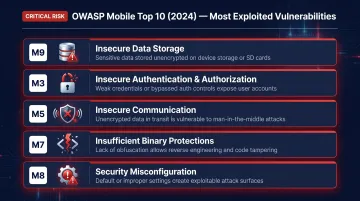
These five categories appear consistently across real-world mobile assessments. Automated tools can flag some of them, but issues like bypassable auth flows and insecure token storage typically require manual verification to confirm exploitability.
How MASVS Turns This List Into Testable Requirements
The OWASP MASVS (Mobile Application Security Verification Standard) v2.1.0 is the companion framework that converts the Top 10 into concrete security controls. The current version organizes requirements into eight control groups:
- MASVS-STORAGE — Data at rest
- MASVS-CRYPTO — Cryptographic implementations
- MASVS-AUTH — Authentication and authorization
- MASVS-NETWORK — Data in transit
- MASVS-PLATFORM — OS and hardware integration
- MASVS-CODE — Code quality and supply chain
- MASVS-RESILIENCE — Anti-tampering and reverse-engineering resistance
- MASVS-PRIVACY — Personal data handling (added in v2.1.0)
These control groups should drive your testing scope. A consumer app may only need coverage across STORAGE, NETWORK, and AUTH — while a fintech or healthcare app warrants full RESILIENCE and CRYPTO depth, especially where active reverse-engineering is a realistic threat.
Types of Mobile App Security Testing Explained
Each testing method finds a distinct class of vulnerabilities. Using only one or two means leaving real risk on the table.
SAST — Static Application Security Testing
SAST analyzes source code or compiled binaries without executing the app. It catches hardcoded secrets, insecure cryptographic implementations, and dangerous API usage early in development — ideally running as a CI/CD pipeline step or IDE plugin.
Best for: Early development stages, code-level flaws, hardcoded credentials, insecure coding patterns Limitation: Requires code access; cannot find runtime-only vulnerabilities
DAST — Dynamic Application Security Testing
DAST tests the running application by simulating attacks against live sessions, API endpoints, and network traffic. It operates as a black box (no source code required) and catches authentication bypasses, session management flaws, and data-in-transit issues that only surface at runtime.
Best for: Runtime vulnerabilities, API testing, traffic interception, pre-release validation Limitation: Limited code-level visibility; misses issues that don't manifest during the test session
IAST — Interactive Application Security Testing
IAST instruments the app during runtime, combining SAST's code-level visibility with DAST's real-world execution context. When a vulnerability surfaces, IAST traces it back to the specific source code location — reducing false positives and cutting remediation time.
Best for: QA-integrated testing, faster triage, reducing noise from DAST findings
SCA — Software Composition Analysis
SCA tracks third-party libraries and open source dependencies against known CVE databases. This matters more than many teams realize: more than 15% of assessed apps contained third-party SDKs with known vulnerabilities (NowSecure, 2025). OWASP ranks inadequate supply chain security as M2 in the 2024 Mobile Top 10.
Best for: Dependency audits, license compliance, supply chain risk management
Manual Penetration Testing
This is the layer that catches what every automated approach misses: business logic flaws, complex multi-step attack chains, authorization bypass patterns, and context-dependent vulnerabilities that require human reasoning to identify.
Automated tools scan for known signatures. They can't reason about how your application is supposed to work, or how an attacker would exploit the gap between intent and implementation. That gap is exactly where business logic flaws live.

Vynox Security was founded after its founders saw this pattern repeatedly: automated scans and compliance-driven assessments consistently missed the logic vulnerabilities and attack chains that real-world attackers exploit. Their manual-first, threat-led mobile pen testing covers static analysis, dynamic runtime testing, reverse engineering, and API interaction analysis, examining how apps handle sensitive data, session tokens, and backend trust relationships.
Top Mobile App Security Testing Tools
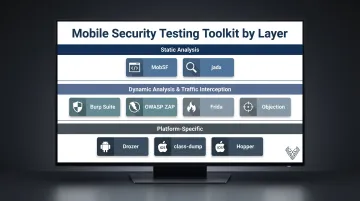
No single tool covers all attack surfaces. Effective mobile security testing requires a layered toolkit organized by function.
All-in-One & Static Analysis
MobSF (Mobile Security Framework) is the most widely used open-source automated scanner for both Android and iOS. It performs static and dynamic analysis, inspects manifests and configurations, flags hardcoded secrets, and generates structured reports suitable for CI/CD integration. Vynox Security's mobile testing stack includes MobSF alongside Frida, Drozer, and jadx.
Use MobSF as a first-pass scanner to identify quick wins and structure initial findings — before deeper manual testing begins.
Dynamic Analysis & Traffic Interception
Burp Suite and OWASP ZAP are the primary tools for intercepting and manipulating mobile app traffic. Configure the mobile device to proxy through either tool to inspect API calls, test for injection vulnerabilities, analyze session tokens, and detect insecure communication patterns.
- Burp Suite Professional ($499/year) — the standard for intensive engagements, with an automated scanner, 300+ extensions, and a workflow built for complex API testing
- OWASP ZAP (free, community-maintained) — covers most standard scenarios and integrates cleanly into CI/CD pipelines for automated traffic analysis
Frida handles dynamic instrumentation by injecting JavaScript into live app processes — enabling SSL pinning bypass, function hooking, and runtime analysis without modifying the app binary.
Objection (built on Frida) adds a command-line interface that extends this capability with platform-specific features:
- iOS: keychain dumping, pasteboard monitoring, filesystem exploration
- Android: root/jailbreak detection bypass, intent monitoring
Together, they cover the dynamic layer that static scanners can't reach.
Platform-Specific Tools
Drozer (Android) probes Android's inter-process communication (IPC) attack surface — content providers, broadcast receivers, exported activities, and services — that generic scanners routinely overlook. Most automated tools don't test IPC; Drozer does.
For iOS binary analysis on non-jailbroken devices, class-dump and Hopper Disassembler allow reverse engineering work where Objection cannot fully operate.
Mobile App Security Testing Best Practices
Map Testing to OWASP MASVS Before Choosing Tools
Before selecting tools or writing test cases, determine which MASVS control groups apply to your application. Use the eight MASVS categories — STORAGE, CRYPTO, AUTH, NETWORK, PLATFORM, CODE, RESILIENCE, PRIVACY — as the checklist that defines scope. Applications handling financial data, health records, or authentication flows warrant deeper coverage across AUTH, CRYPTO, and RESILIENCE than a basic content app.
Integrate Automated Scanning Into CI/CD (Shift-Left)
Configure SAST and SCA tools to run on every code commit. This catches developer-introduced issues when fixes are cheapest, prevents security from becoming a pre-release bottleneck, and maintains a continuous baseline rather than point-in-time snapshots.
ISO 27001 Annex A 8.26 explicitly recommends integrating SAST and SCA into the CI/CD pipeline as part of a secure development lifecycle. MobSF supports this natively via REST APIs and CLI tools.
Important caveat: Shift-left automation addresses code-level and dependency flaws. It does not replace runtime testing or manual business logic validation.
Test on Real Devices, Not Only Emulators
Emulators cannot accurately replicate hardware-level behaviors, OEM-specific Android implementations, or real network conditions. Android's fragmentation problem is real — a vulnerability may exist only on specific device/OS combinations due to manufacturer modifications to the base OS.
Include real device testing for dynamic analysis and penetration testing phases. Emulators work for early SAST and quick scanning; they're insufficient for thorough dynamic assessment.
Always Include the Backend API Layer
The mobile client is one part of the attack surface. The APIs it talks to are frequently the more exploitable target.
OWASP ranks Broken Object Level Authorization (BOLA) as the #1 API security risk — it allows attackers to manipulate object IDs in requests to access data they're not authorized to see, potentially enabling full account takeover. Vynox Security's mobile app assessments include backend API testing as a standard scope component, examining how apps handle session tokens and backend trust relationships.
Any mobile security assessment that stops at the app binary is incomplete.
Supplement Automation With Expert Manual Testing
Automated tools handle scale and volume well. What they miss is application context — how multiple low-severity findings chain together into a critical exploit, or whether a business logic flaw bypasses a control that looks secure in isolation.
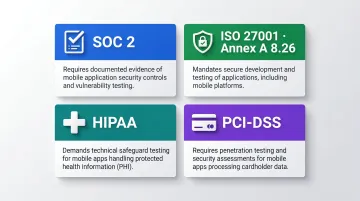
For applications handling sensitive user data, payments, or authentication flows, manual penetration testing is what compliance frameworks actually expect. Auditors for the following frameworks routinely review evidence of periodic assessments:
- SOC 2 — periodic vulnerability assessments and penetration test evidence
- ISO 27001 Annex A 8.26 — security testing as part of the secure development lifecycle
- HIPAA — technical safeguard evaluations for covered applications
- PCI-DSS — annual penetration testing for in-scope cardholder data environments
Vynox Security's mobile penetration testing covers static analysis, dynamic runtime testing, reverse engineering, and API layer assessment — with audit-ready reports delivered within 48 hours.
Frequently Asked Questions
How do you check if a mobile app is secure?
Checking whether a mobile app is secure requires running automated SAST/DAST scans, validating coverage against OWASP MASVS controls, and conducting manual penetration testing. No single check is sufficient — code, runtime behavior, data storage, and API communication all need separate validation.
What is the Mobile Application Security Verification Standard (MASVS)?
MASVS is the OWASP standard defining testable security requirements for mobile apps, organized into eight control groups covering storage, cryptography, authentication, network communication, platform interaction, code quality, resilience, and privacy. Current version is v2.1.0.
Does the Mobile Application Security Testing Guide (MASTG) cover iOS security?
Yes. The OWASP MASTG covers both Android and iOS in dedicated sections, providing platform-specific test cases, tool recommendations, and procedures mapped to MASVS controls for each operating system.
What are the phases of a mobile app penetration test?
A mobile pentest follows the standard phases: scoping, reconnaissance, threat modeling, vulnerability identification, exploitation, and reporting. Mobile-specific additions include binary analysis, certificate pinning bypass, API testing, device storage review, and IPC analysis.
What is the difference between vulnerability scanning and penetration testing?
Vulnerability scanning uses automated tools to identify known weaknesses at scale. Penetration testing involves expert testers actively attempting to exploit those weaknesses to demonstrate real-world impact. Pentesting is the stronger choice for compliance requirements and any application handling sensitive data.
How often should mobile app security testing be performed?
Automated scanning should run on every CI/CD build. Run a full manual assessment before every major release or significant architectural change. Schedule a comprehensive penetration test at least annually, and also whenever the app adds features that handle sensitive data or new authentication flows.